
The thing nobody warned me about with AI coding, once I started leaning on it for serious work, is that the bottleneck stops being the code. It becomes context. The agent will happily write whatever you ask, but if it doesn't know what the rest of the system looks like, what the constraints are, or what's already been decided, you get something that compiles, looks clean, and is wrong in ways you only spot a week later.
So this post is really about context management. And there's a reason that matters so much. LLMs run on the transformer architecture, whose core mechanism is attention: every token gets weighed against every other token in the context. Stretch that across a big, noisy context and the model's attention spreads thin. Keep it tight and on-topic and the model stays sharp. Context management is really focus management.
It's also about how I rotate between different "roles" of the same model to keep each one's context tight. This is what's worked for me since the start of 2026, on a project spanning six repositories, a mix of Go, Node.js, and React. Take it with a grain of salt. What works for me might not work for you, and I'm sure this workflow can and will be improved. But it's the most consistent setup I've landed on so far.
One disclaimer before we start. I use Claude Code on the Max plan, always with the strongest model and the largest context window available. At the time of writing that's Opus 4.7 with the 1M context window, on high effort. I run Claude Code in the Warp terminal and use Zed as my editor. Different models behave differently, and you might need to adjust the prompts below. None of what follows is a magic recipe. It's a shape of working that you can bend.
The three roles I rotate between
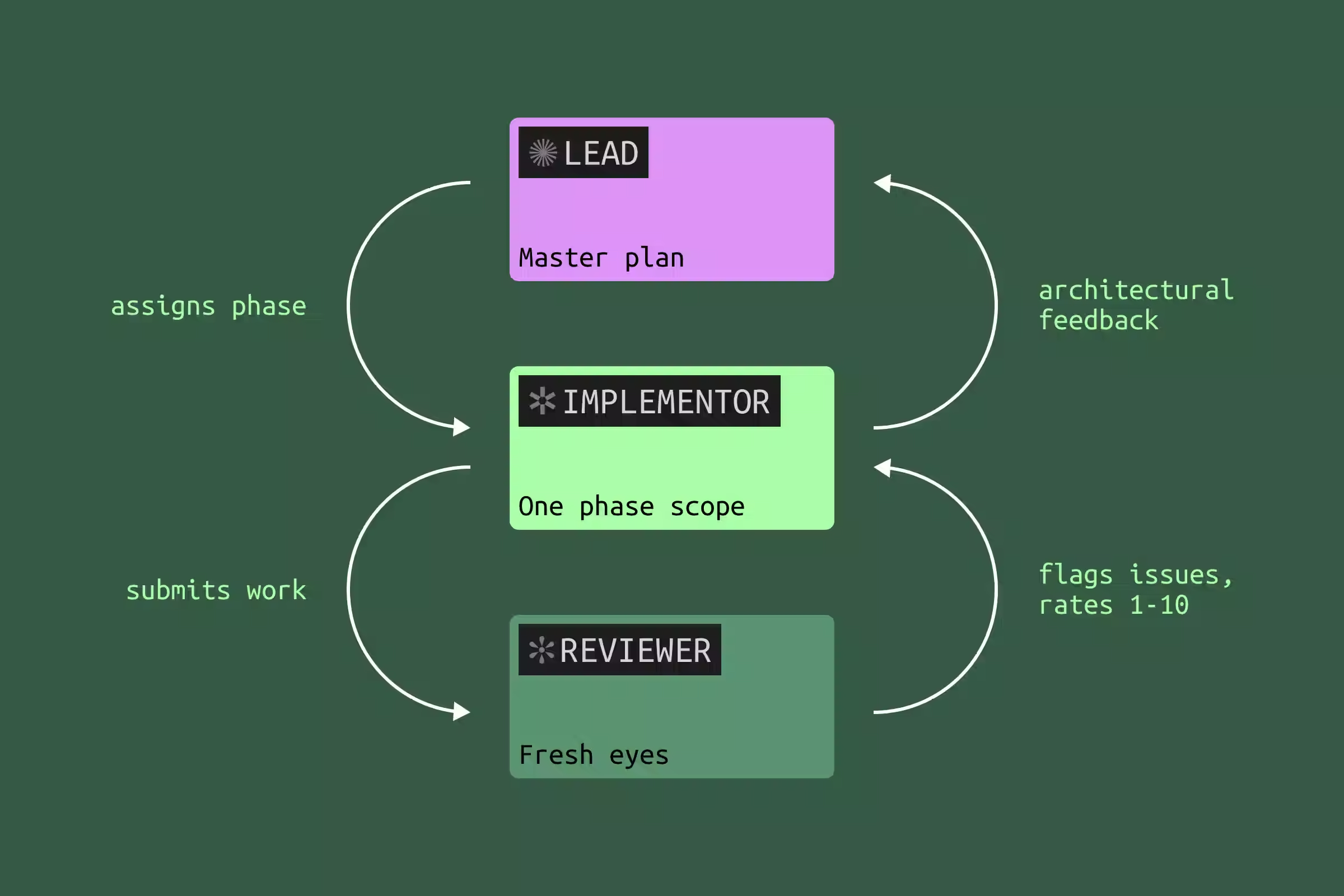
The single biggest mental shift for me was to stop thinking of "the AI" as one entity and start thinking of it as three roles I move between. Each one has a different brief, a different prompt style, and, crucially, a different scope of context.
The lead planning agent owns the architecture. It writes the master plan, defines the contracts between services, and decides what each phase of work looks like. I treat its output as the closest thing the project has to a source of truth.
The implementer agent picks up one phase of the plan and goes deep. It only needs to know its slice. If it bumps into something that affects the broader plan, it surfaces a question. It doesn't decide on its own.
The reviewer agent comes in cold, with no investment in any of the choices, and reads the implementer's work against the master plan. It looks for issues, simplifications, and things that don't quite line up.
The loop is reviewer → implementer → lead. The reviewer flags issues. The implementer decides which are real and pushes back on the rest. Anything architectural floats up to the lead, who updates the master plan if needed.
The example I'll use throughout
To make this concrete I'll borrow a project I worked on recently: building out a webhooks system for a SaaS app. Three moving parts:
- A Go delivery service that signs and sends webhooks, with retries and a dead-letter queue.
- A React dashboard where users register endpoints, rotate signing secrets, and replay deliveries.
- A small update to the marketing site to document the new feature.
It's a useful example because it spans multiple repositories, mixes languages, includes both new code and a refactor of an existing event publisher, and has the kind of subtle integration points where AI tends to drift if you don't keep it on a leash. But the example is just scaffolding. The workflow is what we're really talking about.
The workflow
The short phrases I drop in quotes below are paraphrases of the canned prompts I keep saved in a snippet expander. You'll find the full versions at the end of the post.
1. Build the master plan with the lead agent
I literally use plan mode, with one explicit goal: produce a plan as a Markdown file in the repo. Not a quick paragraph the agent gives me in the conversation that disappears the moment I close the session. A real plan.md committed to the repo, so every later agent I open can be pointed at the same source of truth.
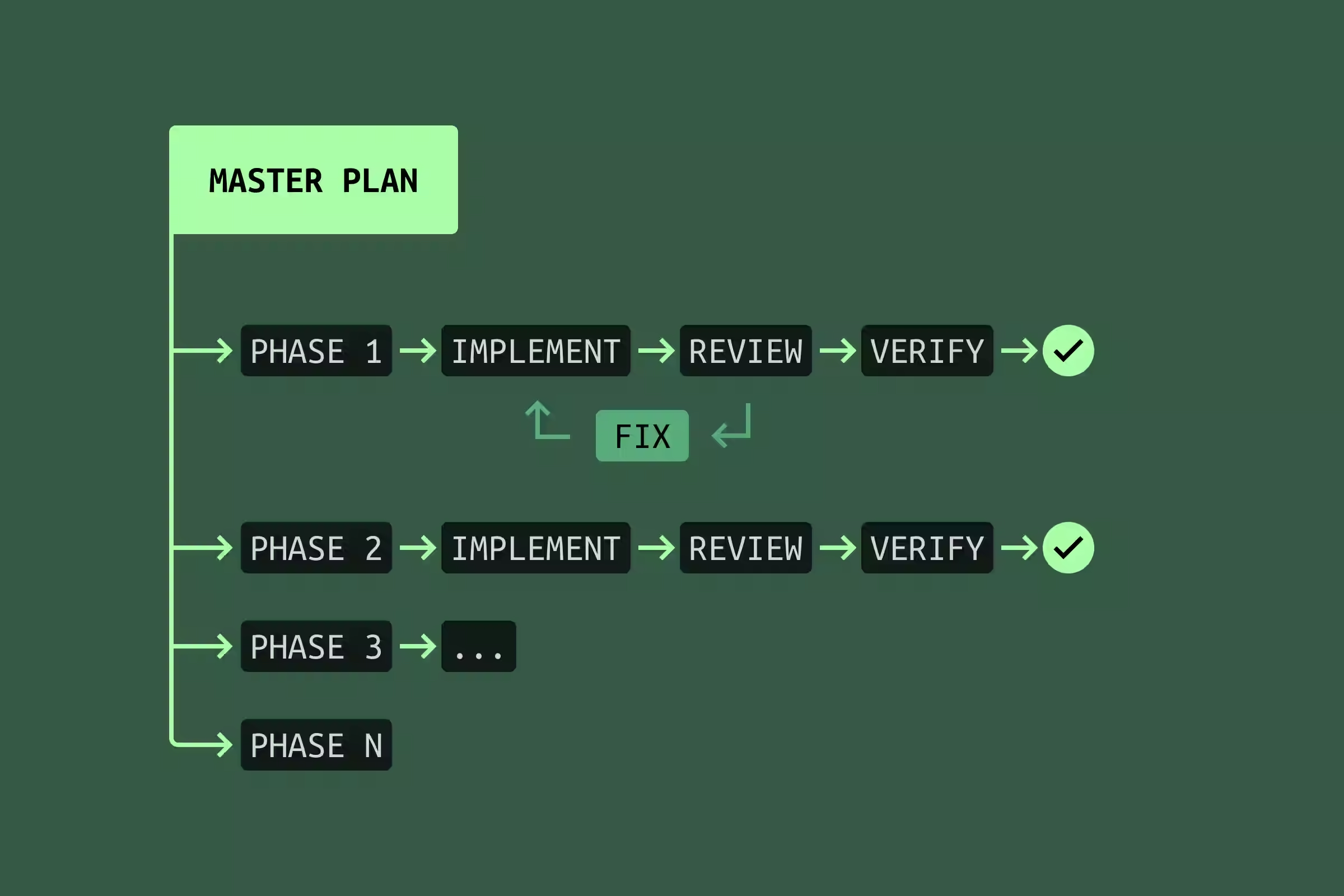
The plan is divided into phases. One phase equals one agent's scope. Agent 1, Agent 2, Agent 3, and so on. Each phase ends with tests that verify that scope is implemented correctly. For the webhooks project, Agent 1 was the delivery service core, Agent 2 was signing and signature verification, Agent 3 was the dashboard, Agent 4 was the docs.
I iterate on this plan ruthlessly before any code is written. I'll often spin up a second lead-style session and ask it to review the plan with fresh eyes. The plan is by far the highest-leverage artifact in the whole workflow. Bugs in the plan multiply across every phase that follows.
2. Launch Agent 1 to implement phase 1
I start the implementer in plan mode too. Its job is to plan how it will execute its slice of the master plan, then implement it. The prompt looks roughly like this:
You are Agent 1 according to the plan at /path/plan.md. Think hard
about how to implement your scope in the context of the whole plan.
What happens next is the part most people skip. Agent 1 will, fairly often, surface something: a simplification, a contradiction, a sub-decision the master plan didn't pin down. Don't let the implementer just decide. Bounce it back to the lead.
In the webhooks example, Agent 1 noticed that the master plan called for a separate retry queue when the delivery service's existing job runner could already handle retries with a small extension. That kind of thing affects later phases. So I copied the implementer's note to the lead, asked "what's your take?", got a green light, updated plan.md, and only then went back to the implementer with "the lead has updated the master plan with your suggestion, please continue."
That round-trip costs maybe ten minutes. It saves a re-implementation later.
3. Run a reviewer against Agent 1's work
When Agent 1 says it's done, I open a fresh session and brief it as a reviewer. The prompt is something like "rate this implementation against the master plan, find issues, find ways to simplify, the code is not committed yet."
Whatever the reviewer finds, I don't just ship to the implementer as a list of demands. I run it past the implementer first ("here's what a reviewer flagged, what's your take?"), because the implementer has the deepest context on its phase and is best placed to say "yes, real issue" or "no, the reviewer misread how this interacts with the job runner." Then the implementer fixes the real ones. Then I go back to the reviewer with "issues 1, 2, and 6 are fixed, please re-check."
If the reviewer finds a lot of issues, after the fixes I'll usually run a brand-new reviewer in a fresh session with the same prompt. Cheap insurance.
4. Verify the phase end-to-end
Tests are necessary but never sufficient. Before I sign off on a phase I run the actual feature against the actual world. For the webhooks delivery service that meant exposing my local Go service through a LocalCan Public URL (tunnel) and pointing the upstream service at it, so I could trigger real events and watch the whole signing-delivery-retry loop happen against a live system. That last step has caught more bugs than any unit test I've ever written, especially the kind that hide in headers, encoding, and timing.
Because LocalCan has a CLI, this isn't always something I do by hand. The agent can drive it straight from its bash tool: bring up a Public URL, point the upstream service at it, fire test events, read what comes back, iterate until the loop is clean. That turns end-to-end verification into one more feedback loop the agent runs on its own, no different in spirit from running the test suite.
Only after all four steps does the phase actually get marked done in plan.md.
5. Repeat for every remaining phase
That's the whole game. A fresh implementer session for Agent 2, a fresh reviewer against its work, an end-to-end verify, then a checkmark in plan.md. Then Agent 3, then Agent 4. On a real project this loop fires six or seven times before everything is in. The cadence stays the same on every pass, and plan.md is the one thing every session has in common. That's exactly why so much effort goes into the plan up front.
Bypass mode, on a clean tree
I default to Claude Code's bypass-permissions mode, where the agent doesn't have to ask before every shell command. It's a huge productivity unlock, but it's only safe if I can throw away whatever the agent did in one command. So my rule is simple. Clean working tree before I hit go (no uncommitted diff, branch in a known place), then I let bypass mode rip. If anything goes sideways, git restore . and I'm back where I started.
The other half of the safety net lives in ~/.claude/settings.json, where I deny-list the destructive git operations I'd hate to lose to a mistake.
{
  "permissions": {
    "deny": [
      "Bash(git push *)",
      "Bash(git commit *)",
      "Bash(git reset --hard*)",
      "Bash(git clean *)",
      "Bash(git checkout --force*)",
      "Bash(git branch -D *)"
    ],
    "defaultMode": "bypassPermissions",
    ...
  },
  ...
}
Pushes and commits I keep for myself. The rest are the operations that can quietly destroy work. Everything else, the agent can run freely.
Things I learned the hard way
A few things that aren't part of the workflow itself but make a big difference in practice.
Lean heavily on planning. Iterate and polish the master plan like crazy. Have other agents review the plan, not just the code. Bugs caught at the plan stage cost minutes. Bugs caught after Agent 3 has built on top of Agent 1's mistake cost hours and a lot of patience.
Ask for tests up front, especially for bugs. When fixing a bug, I ask the agent to write the failing test first, run it, watch it fail, then fix the code, then watch it pass. Old-school TDD, but it works extremely well with agents because it forces them to be specific about what "broken" actually means.
Give the agent a way to see its own work. Tests aren't only there for verification. When the agent can run them itself and watch them go from red to green, it'll iterate on its own. The same goes for a screenshot diff against a mock, an integration test that hits a live service, an auto-formatter, anything with a tight feedback loop. Two or three rounds of self-correction often turn pretty close into right. Whatever your domain, find the thing the agent can use as eyes on its own output and put it within reach.
Name unusual patterns explicitly in the prompt. If your codebase has a non-obvious convention (say, a preload script that calls X, then Y, then polls Z before responding), say so in the prompt and point at the file. "There's a pattern in preload.ts that does X then Y then polls Z, use something similar if it makes sense." Without that, the agent will reach for whatever convention is most common in its training data, which is often not yours.
Give the agent room to think. This is the one I underestimated for the longest time. If I'm not 100% sure my approach is right, I don't issue a command. I open a question.
- "I'd like XYZ. What options do we have?"
- "I'd like XYZ. What's your take?"
- "Is there anything to improve or simplify here?"
- "Is this the optimal approach?"
- "Use the X pattern, if it makes sense."
That last phrase, if it makes sense, is doing more work than it looks. It tells the agent that disagreeing is allowed. Without it, even good models tend to follow your suggestion politely past the point where they shouldn't.
The prompts I keep on a snippet expander
To avoid retyping the same scaffolding ten times a day, I have these saved in Espanso. Raycast's snippets work just as well. None of them are clever. They're just the connective tissue of the workflow above.
Bouncing an implementer's finding to the lead:
Agent 1 found this issue/optimization in his scope, what's your take?

[paste Agent 1 statement here]
Briefing an implementer for a later phase:
You are Agent 4 according to the plan at /path/plan.md. Think hard
about how to implement your scope in context of the whole plan.
Agents 1-3 already did their work.
Reviewing an implementer's work against the plan:
Your task is to review and rate (1-10 scale) the implementation of
Agent 1 according to the master plan at /path/plan.md. Find issues
and ways to optimize or simplify. Code is not committed yet.
Reviewing without a master plan in play (a smaller change):
Your task is to rate and review (1-10 scale) the implementation of
the AI agent whose task was to ... Code is not committed yet.
Challenge the implementer with what the reviewer has found, without expressing my own judgment.
What's your take on this statement from an AI reviewer agent?

[paste reviewer agent statement here]
And the smallest one, which I use a hundred times a week, as I block git commit * in settings, I only commit manually, myself.
Suggest a short commit message.
What this isn't, and what's held up
This is not a silver bullet. The loop has real overhead. There's a reason I don't reach for it when I'm fixing a typo or renaming a variable. On small, isolated changes it's overkill. The point at which it starts to pay back is the moment a change touches more than one repository, more than one language, or more than one mental model. Below that line, just write the code.
It's also not finished. Agents get better, context windows grow, and things I do today by hand will probably be automated in six months. Some of this advice will look quaint by next year.
There's also something I've come to value about passing notes between agents myself. Every handoff between agents is a moment where my own judgement gets to weigh in. Across a phase, those moments add up to a real understanding of how the code holds together, at least at a high level. It's slower than letting the agents talk to each other directly, but the trade is awareness, and on a project I'll have to maintain for years, that's not a trade I want to lose.
But the core has held up so far: context management, rotating between roles, and ruthless planning before any code is written. If you take one thing from this post, take that. The model is the part that changes. The shape of working around it is what compounds.
