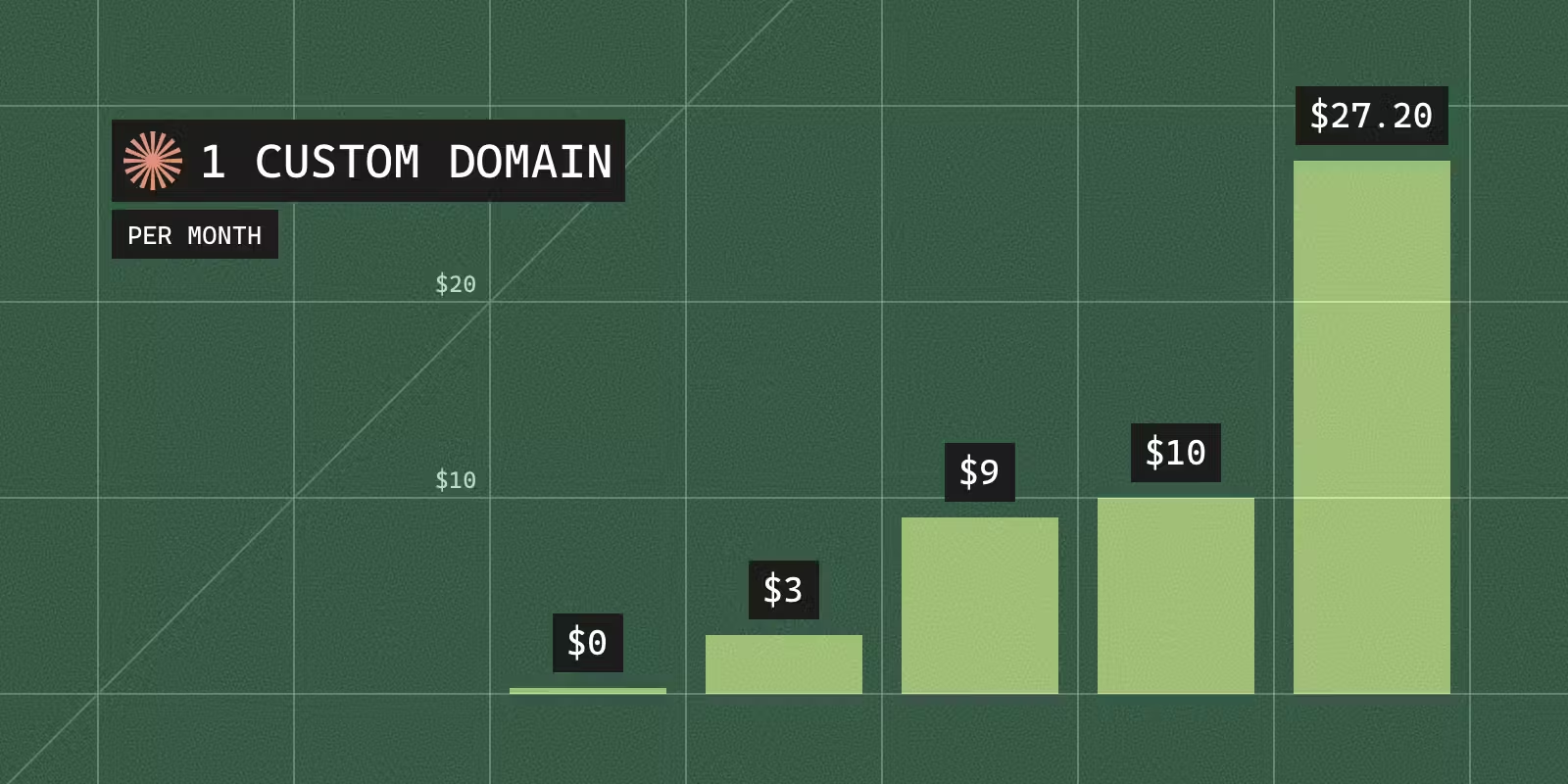

To put a localhost tunnel on your own domain, you add a CNAME record for a subdomain such as app.example.com that points at the tunnel service, and the service issues the HTTPS certificate once the record resolves. On ngrok that needs the Pay-as-you-go plan, $20 a month plus $0.01 for every active hour of the domain, and the free plan refuses with ERR_NGROK_314. Cloudflare Tunnel charges nothing, but only for a domain whose DNS is on Cloudflare. Pinggy, localhost.run and LocalCan take a CNAME from any DNS provider on a paid plan. Tailscale Funnel has no custom domains, and localtunnel's hosted service hands out only names under its own domain.
I build LocalCan, so weigh the comparison with that in mind. Prices were checked in November 2026, and each section links its source. The terminal output is from November 4, 2026, with ngrok 3.39.13 and cloudflared 2026.10.7. An AI assistant helped draft this post. The commands and numbers come from my own runs.
If you want a name like myapp.local that only your own machine and network reach, that is local DNS rather than a tunnel, and local domains covers it.
Can you use a custom domain on ngrok's free plan?
No. The ngrok pricing page↗ lists your own domain on Pay-as-you-go and up, and the custom domain guide↗ says custom domains are only available on Pay-as-you-go. A free account that asks for one gets this:
$ ngrok http 5999 --url https://preview.example.com
ERROR:  failed to start tunnel: Only paid plans may create endpoints with custom hostnames.
ERROR:  Failed to create an endpoint with the custom hostname 'preview.example.com' for the account 'you@example.com'.
ERROR:  This account is on the 'Free' plan.
ERROR:
ERROR:  Upgrade to a paid plan at: https://dashboard.ngrok.com/billing/choose-a-plan
ERROR:
ERROR:  ERR_NGROK_314
ERROR:  https://ngrok.com/docs/errors/err_ngrok_314
ERROR:
The plan check fails before the tunnel starts, so nothing on port 5999 was ever exposed.
The free plan does include one fixed name, which ngrok calls a static dev domain (announcement↗). It is assigned automatically, ends in ngrok-free.dev or ngrok-free.app (domains↗), and is the only domain a free account can use (free plan limits↗). Hobbyist, at $10 a month, raises that to 10 ngrok-branded domains, still not your own.
What does an ngrok custom domain cost?
Pay-as-you-go is $20 a month plus usage, and each domain you bring costs $0.01 per active hour (ngrok pricing↗). A domain that is active every hour of a 30-day month is 720 hours, or $7.20 on top of the $20, so $27.20 a month in all. Pinggy's Pro plan, the cheapest paid option in the table below, is $3 a month.
How do you set up a custom domain on ngrok?
The custom domain guide↗ has four steps:
-
Add the domain on the Domains page of the ngrok dashboard. ngrok shows a CNAME target such as
exampledata.otherdata.ngrok-cname.com. -
At your DNS provider, create a CNAME record with the name
appand that target as the value. -
Start the endpoint on your domain:
Bashngrok http 3000 --url https://app.example.com -
Wait for the certificate. ngrok provisions it "from an ACME provider such as Let's Encrypt" once the record resolves. Until then the default wildcard certificate doesn't match your hostname, and browsers show a warning.
An apex domain such as example.com can't take a standard CNAME, so ngrok accepts one only through DNS providers that offer ALIAS, ANAME or CNAME flattening.
Can Cloudflare Tunnel use your own domain?
Yes, and Tunnel is "available on all plans" (Cloudflare Tunnel↗), so it costs nothing as long as the domain's DNS is on Cloudflare. The getting started page↗ lists "A domain on Cloudflare (required to publish applications)" as a prerequisite. Keeping your DNS elsewhere and pointing one CNAME at Cloudflare is a partial setup, which is "only available to customers on a Business or Enterprise plan" (partial setup↗). Business costs $200 a month billed annually, or $250 billed monthly (Cloudflare plans↗).
A quick tunnel won't get you there either. The cloudflared agent accepts --hostname on a quick tunnel without an error, then ignores it. These are the relevant lines of the run:
$ cloudflared tunnel --url http://localhost:5999 --hostname preview.example.com
2026-11-04T23:00:22Z INF Requesting new quick Tunnel on trycloudflare.com...
2026-11-04T23:00:28Z INF |  Your quick Tunnel has been created! Visit it at (it may take some time to be reachable):  |
2026-11-04T23:00:28Z INF |  https://physically-ton-witness-assignments.trycloudflare.com                              |
2026-11-04T23:00:28Z INF Settings: map[ha-connections:1 hostname:preview.example.com protocol:quic url:http://localhost:5999]
The settings line shows that cloudflared read the hostname, and the URL it printed is a random trycloudflare.com name. Quick tunnels need no account or domain, and the hostname changes every time you start one (quick tunnels↗).
A named tunnel is the way to your own hostname, and creating or routing one needs a Cloudflare login first. Without one, cloudflared stops at the certificate:
$ cloudflared tunnel route dns my-tunnel preview.example.com
2026-11-04T23:00:53Z ERR Cannot determine default origin certificate path. No file cert.pem in [~/.cloudflared ~/.cloudflare-warp ~/cloudflare-warp /etc/cloudflared /usr/local/etc/cloudflared]. You need to specify the origin certificate path by specifying the origincert option in the configuration file, or set TUNNEL_ORIGIN_CERT environment variable originCertPath=
Error locating origin cert: client didn't specify origincert path
Running cloudflared tunnel create my-tunnel stops with the same error. The cert.pem file comes from cloudflared tunnel login, which opens a browser, asks you to log in and select your hostname, then writes the file (local tunnel setup↗). The hostname you route must be in that account, because the tunnel's cfargotunnel.com name "only proxies traffic for DNS records in the same Cloudflare account" (DNS records↗).
Which tunnels support a custom domain, and what do they cost?
| Tool | Your own domain | Cheapest plan with it | DNS record you create |
|---|---|---|---|
| ngrok | Yes | Pay-as-you-go, $20/month + $0.01 per active hour per domain | CNAME to an ngrok-cname.com target. Apex needs ALIAS, ANAME or flattening |
| Cloudflare Tunnel | Yes, if the domain's DNS is on Cloudflare | $0. DNS kept elsewhere needs Business, $200/month billed annually | CNAME to the tunnel's cfargotunnel.com name, made by cloudflared or the dashboard |
| Tailscale Funnel | No, ts.net names only | n/a | n/a |
| localtunnel | Not on the hosted service | Self-hosted server only | DNS for your domain and its wildcard, on your own server |
| Pinggy | Yes, apex or subdomain | Pro, $3/month or $2.50/month billed annually, per seat, 1 custom domain each | CNAME to the target the dashboard shows. Apex: TXT plus A and AAAA records to a relay |
| localhost.run | Yes, apex or subdomain | Custom Domain, $9/month billed annually, per domain, its subdomains included | TXT on _lhr.<domain>, plus a CNAME to cd.localhost.run or 3 A records |
| LocalCan | Yes, subdomains | Solo, $10/month or $96/year, 2 custom domains | The CNAME shown on the Dashboard |
For two hostnames that is $6 a month on Pinggy, $10 on LocalCan Solo, $9 on localhost.run (billed annually) if both sit under one domain or $18 if not, and $34.40 on ngrok with both domains active all month.
If your DNS is already on Cloudflare, a named Cloudflare Tunnel puts your domain on a tunnel at $0. If it lives elsewhere, Pinggy is the cheapest paid option, and Pinggy and localhost.run are the two that also take a bare domain like example.com from any DNS provider.
For free tiers, speed and everything besides domains, see ngrok alternatives compared on free tiers and prices.
Tailscale Funnel can only use DNS names in your tailnet's domain, so the URL always ends in ts.net (Funnel↗). The Tailscale Funnel alternative post measures Funnel's other limits.
localtunnel's client can request a name on its server with --subdomain, and documents no option for a domain you own (localtunnel↗). Its server is open source. Point DNS for your domain and its wildcard at a server you run, and the lt client connects to it with --host (localtunnel server↗).
Pinggy is the cheapest paid route in the table. You add a CNAME to the target its dashboard shows, such as ahsu9ol.a.pinggy.link, click Validate, then issue a Let's Encrypt certificate from the dashboard (Pinggy custom domains↗, pricing↗). A bare domain such as example.com goes through a relay instead: a TXT record to prove ownership, then A and AAAA records pointing at the relay region you pick (Pinggy relays↗).
localhost.run also takes an apex domain. Setup is a TXT record on _lhr.<your domain> holding your domain ID, then a CNAME to cd.localhost.run or three A records, and the tunnel itself is plain SSH (localhost.run custom domains↗):
ssh -R app.example.com:80:localhost:8080 plan@localhost.run
LocalCan puts a Public URL (also called a tunnel) on your subdomain with the same CNAME pattern. Add a subdomain such as preview.example.com on the Dashboard↗, create the CNAME record it shows, and verification usually takes a few minutes. LocalCan then handles the certificate, and a custom domain never expires, unlike a Public URL on localcan.dev. Custom domains work with HTTP Public URLs, not TCP (custom domains). Solo is $10 a month or $96 a year with 2 custom domains, Pro is $16 a month or $144 a year with 4, and the Lifetime License is $99 once with 2 (pricing).
localcan http 3000 --domain preview.example.com
Why does custom domain verification fail?
Before ngrok, Pinggy, localhost.run or LocalCan issues a certificate, it checks that your hostname resolves to it. Four DNS problems stop verification or the certificate.
Is the CNAME proxied by Cloudflare?
With the proxy on (the orange cloud), Cloudflare answers queries for the name with its own anycast addresses instead of your CNAME target (proxy status↗), so the tunnel service never sees its target. ngrok reports this as ERR_NGROK_515↗: "The domain DOMAIN is proxied by Cloudflare. While the record correctly resolves to Cloudflare's edge and may be working correctly, we cannot verify it." Pinggy's docs and LocalCan's custom domain docs both say to set the record to DNS only.
Does a CAA record leave out the tunnel's certificate authority?
A CAA record names the certificate authorities allowed to issue for a domain and its subdomains. The CA checks the hostname, then each parent name, and stops at the first CAA record it finds (Let's Encrypt on CAA↗). ngrok, Pinggy and localhost.run all mention Let's Encrypt in their docs, so a CAA set that leaves out letsencrypt.org blocks the certificate even when the CNAME is right. Check the registered domain:
dig +short CAA example.com
No output means no CAA record at that name. Two real answers from November 4, 2026 show a set that leaves out Let's Encrypt and one that includes it:
$ dig +short CAA google.com
0 issue "pki.goog"
$ dig +short CAA github.com
0 issue "digicert.com"
0 issue "globalsign.com"
0 issue "letsencrypt.org"
0 issue "sectigo.com"
0 issuewild "digicert.com"
0 issuewild "letsencrypt.org"
0 issuewild "sectigo.com"
Under google.com only Google's own CA may issue, so Let's Encrypt would refuse a certificate for any subdomain of it that has no CAA record of its own. github.com lists Let's Encrypt. If your domain's set looks like the first one, add a record such as 0 issue "letsencrypt.org" for the CA your tunnel uses.
Is the CNAME at the apex?
A standard CNAME can't sit at the zone apex, the bare example.com (ngrok custom domains↗). Use a subdomain such as app.example.com, or one of the apex routes in the table above.
Is an old A record still on the name?
A name with a CNAME can't have any other records (Let's Encrypt on CAA↗, RFC 1034, section 3.6.2↗). An A or AAAA record left on app.example.com from an old server or a parked page has to go before the CNAME can take its place. On Cloudflare, cloudflared tunnel route dns --overwrite-dns replaces an existing record with the same name.
How do you check the record?
Ask a resolver what it sees:
dig +short CNAME app.example.com
It should print the target your tunnel service gave you. No output means the CNAME is missing or proxied, and a different name means it points at the wrong target. ngrok reports those two as ERR_NGROK_425↗, "Domain DOMAIN CNAME record not found", and ERR_NGROK_427↗, "Domain DOMAIN CNAME record resolved to HAVE, should have been WANT".