
To open localhost on your phone, put the phone on the same Wi-Fi as your computer, make the dev server listen on the network, and open http://<your computer's LAN IP>:<port> in the phone's browser. Vite needs the --host flag for that. Next.js listens on the network by default, but it blocks its dev resources, such as the hot-reload connection, from the IP until you allow it, so the page loads and never becomes interactive.
Even when the page works, a LAN IP over plain HTTP is not a secure context, so the phone's browser hides service workers, the camera and the clipboard from it. A .local name with a trusted certificate fixes that on the same Wi-Fi, and a Public URL (also called a tunnel) works from any network, cellular included.
I ran everything below on 15 October 2026 with an iPhone 16 Pro Max on iOS 27.0 (Safari), a Mac on home Wi-Fi, Vite 8.3.4, Next.js 16.4.0 and the LocalCan CLI 1.3.1. An AI assistant helped draft this post. The commands and numbers come from my own runs. The steps are for web pages. For a React Native app in Expo Go, see the Expo and LocalCan tutorial.
Why doesn't localhost work on my phone?
On the phone, localhost is the phone itself. It needs your computer's address on the network, and the dev server has to listen on that address. Vite doesn't by default:
$ npx vite

  VITE v8.3.4  ready in 436 ms

  ➜  Local:   http://localhost:5173/
  ➜  Network: use --host to expose
The socket it opened, and what a connection to each address gets:
$ lsof -nP -iTCP:5173 -sTCP:LISTEN
COMMAND   PID  USER   FD   TYPE             DEVICE SIZE/OFF NODE NAME
node    60920 you     16u  IPv6 0x6466474b88843915      0t0  TCP [::1]:5173 (LISTEN)

$ curl -sS -o /dev/null -w "%{http_code}\n" http://localhost:5173/
200

$ curl -sS -m 5 -o /dev/null -w "%{http_code}\n" http://192.168.50.96:5173/
curl: (7) Failed to connect to 192.168.50.96 port 5173 after 1 ms: Could not connect to server
000

$ curl -sS -m 5 -o /dev/null -w "%{http_code}\n" http://127.0.0.1:5173/
curl: (7) Failed to connect to 127.0.0.1 port 5173 after 0 ms: Could not connect to server
000
Vite 8 listened on the IPv6 loopback address [::1] and nothing else. The LAN IP was refused, and so was 127.0.0.1 on the Mac itself, so swapping localhost for 127.0.0.1 doesn't help here either.
How do I open my dev server on a phone on the same Wi-Fi?
Start the dev server so it listens on every interface. With Vite, add --host (or set server.host: true in vite.config.js, per the Vite server options↗):
$ npx vite --host

  VITE v8.3.4  ready in 86 ms

  ➜  Local:   http://localhost:5173/
  ➜  Network: http://192.168.50.96:5173/  en0
  ➜  Network: http://192.168.139.3:5173/  bridge100
  ➜  Network: http://192.168.97.0:5173/   bridge101
  ➜  Network: http://192.168.107.0:5173/  bridge102
Vite prints one Network line per interface. On my Mac, en0 is the Wi-Fi, and that's the address the phone needs. The bridge lines are OrbStack's virtual machine networks, which a phone can't reach. If your dev server doesn't print a Network line, ask macOS for the address of the Wi-Fi interface:
$ ipconfig getifaddr en0
192.168.50.96
On Windows, run ipconfig and look for the IPv4 Address under the Wi-Fi adapter.
Then type http://192.168.50.96:5173/ into the phone's browser. On my iPhone the page loaded on the first try. Vite's docs describe --host as listening on "all addresses, including LAN and public addresses", so everyone else on that Wi-Fi can open your dev server too. Use it on networks you trust.
If the phone can't connect, check these first:
- The phone is on the same network. Cellular data can't reach a private
192.168.x.xaddress, and a guest Wi-Fi network often can't either. - The computer's firewall lets Node accept incoming connections (on a Mac, see Apple's firewall settings guide↗). Mine was off for these runs, and I didn't test Windows.
- A VPN on either device isn't routing the traffic somewhere else.
- On an iPhone, apps must ask for Local Network access before they reach devices on your network, and you can turn it on per app under Settings, Privacy & Security, Local Network, as Apple's guide to Local Network access↗ explains. Safari didn't ask on my iPhone, so check this when another browser can't load the LAN IP.
Why does my Next.js app load on the phone but nothing works?
Next.js listens on all interfaces without a flag (-H defaults to 0.0.0.0 in the Next.js CLI reference↗) and prints the Network URL itself:
$ npx next dev
▲ Next.js 16.4.0 (Turbopack)
- Local:         http://localhost:3000
- Network:       http://192.168.50.96:3000
✓ Ready in 257ms
✓ Running next.config took 10ms
The page from http://192.168.50.96:3000/ arrived with a 200, but a one-component Next.js page that prints whether React hydrated said "Hydrated: no" in Safari in the iOS Simulator and in Chrome on the Mac. Buttons and forms on a page like that do nothing. The dev server printed why:
⚠ Blocked cross-origin request to Next.js dev resource /_next/hmr from "192.168.50.96".
Cross-origin access to Next.js dev resources is blocked by default for safety.

To allow this host in development, add it to "allowedDevOrigins" in next.config.js and restart the dev server:

// next.config.js
module.exports = {
  allowedDevOrigins: ['192.168.50.96'],
}

Read more: https://nextjs.org/docs/app/api-reference/config/next-config-js/allowedDevOrigins
Add that line to next.config.js and restart the dev server. After the restart both browsers said "Hydrated: yes". The same check fires for any other name you open the app by, and the Invalid Host Header error page has the setting for each framework.
Why are the camera, service worker and clipboard missing on the LAN IP?
Browsers expose a list of APIs only to secure contexts↗: pages served over HTTPS, or from localhost and the loopback addresses. On the Mac, http://localhost:5173 qualifies. On the phone, http://192.168.50.96:5173 is neither HTTPS nor loopback, so it doesn't.
My test page runs seven checks, which ask whether each API exists at all, before any permission prompt: window.isSecureContext, navigator.serviceWorker, navigator.mediaDevices.getUserMedia (camera and mic), crypto.subtle, crypto.randomUUID, navigator.clipboard and navigator.share. One load per URL:
| URL | iPhone 16 Pro Max, Safari | Chrome 155 on the Mac (headless) |
|---|---|---|
http://localhost:5173 | Not applicable (the phone itself) | 7 of 7 |
http://192.168.50.96:5173 (LAN IP) | 0 of 7 | 0 of 7 |
https://happy-owl.local:5443 (.local name) | 7 of 7 | 7 of 7 |
https://happy-owl.localcan.dev (Public URL) | 7 of 7, on Wi-Fi and on 5G | 7 of 7 |
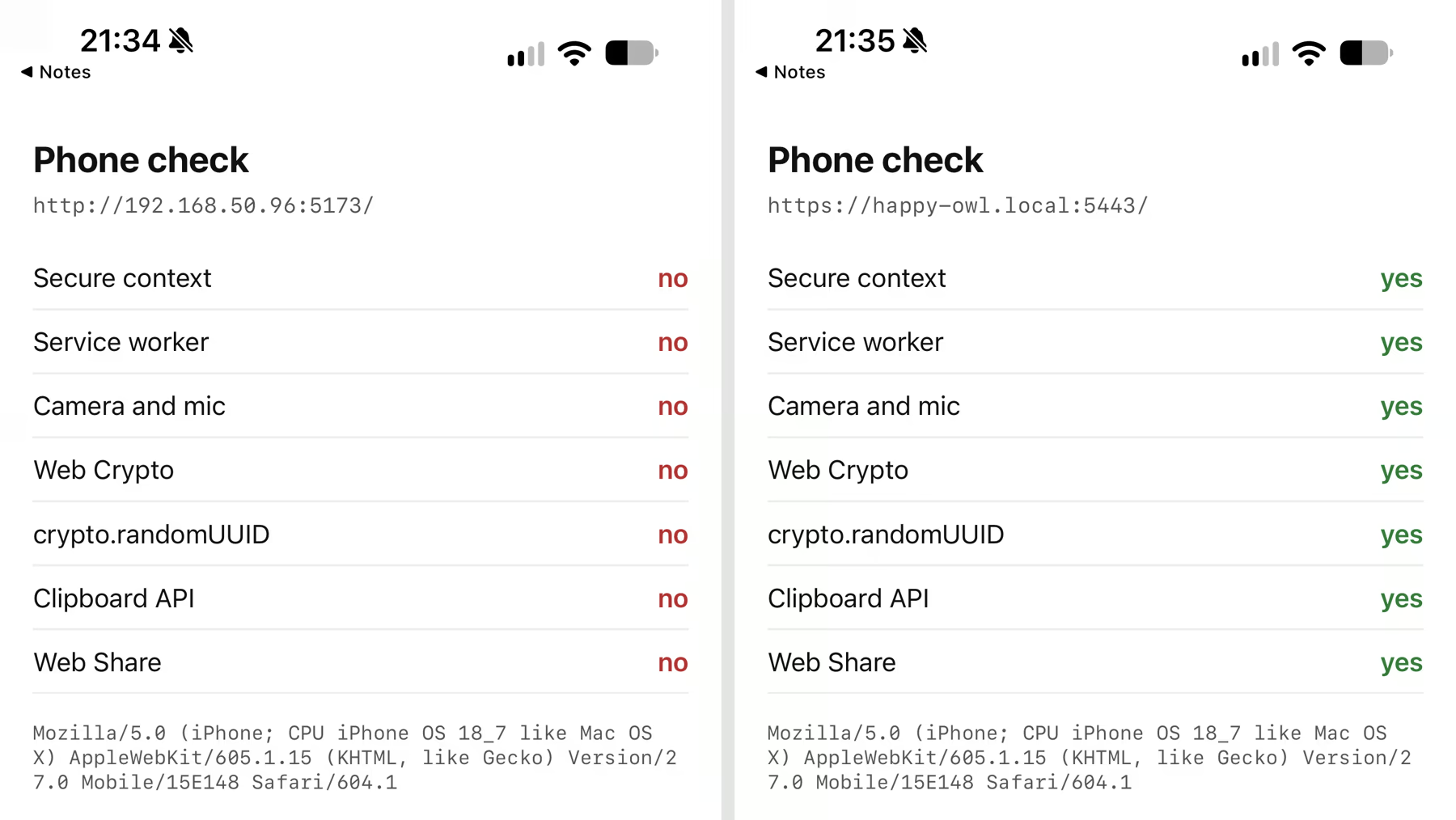
Code that calls crypto.randomUUID() to make IDs works on the Mac and fails on the LAN IP, since the function isn't there. On the LAN IP, a PWA can't be tested for install or offline mode either.
How do I get HTTPS on the phone over Wi-Fi?
Give the dev server a .local name with a certificate. The command localcan http <port> does that and opens a Public URL in the same step:
$ localcan http 5173
Connecting tunnel to http://localhost:5173...
Forwarding https://happy-owl.local:5443 → localhost:5173
Forwarding http://happy-owl.local → localhost:5173
Forwarding https://happy-owl.localcan.dev → localhost:5173
My Mac runs OrbStack on ports 80 and 443, so LocalCan's HTTPS proxy is set to port 5443 in the daemon config here. On a default install it uses 443 and the name has no port, as in the quick tunnels docs. LocalCan announces the name on the network over mDNS (Bonjour, see local domains), and it resolved to the Mac's LAN IP, so the phone doesn't need to know the IP. Without a LocalCan license, the command gives you the .local name but no Public URL.
The certificate is signed by LocalCan's own root certificate. Before the phone trusts it, Safari stops at "This Connection Is Not Private" (I saw this in the iOS Simulator). Send the root certificate to the iPhone with AirDrop and trust it once, as in installing the root certificate on iPhone. On my iPhone the .local name loaded with no warning and passed all seven checks.
Vite refuses a hostname it doesn't know, and the .local name and the Public URL both got a 403 at first:
$ curl -sS --cacert ~/.localcan/certs/rootCA.pem -w "\nHTTP %{http_code}\n" https://happy-owl.local:5443/
Blocked request. This host ("happy-owl.local") is not allowed.
To allow this host, add "happy-owl.local" to `server.allowedHosts` in vite.config.js.
HTTP 403

$ curl -sS -w "\nHTTP %{http_code}\n" https://happy-owl.localcan.dev/
Blocked request. This host ("happy-owl.localcan.dev") is not allowed.
To allow this host, add "happy-owl.localcan.dev" to `server.allowedHosts` in vite.config.js.
HTTP 403
The LAN IP was never blocked, because Vite allows all IP addresses by default↗. A leading dot allows a domain and all its subdomains:
import { defineConfig } from 'vite'

export default defineConfig({
  server: {
    allowedHosts: ['.localcan.dev', '.trylocalcan.com', '.local'],
  },
})
The .trylocalcan.com entry is for the Free plan, which gives one Public URL at a time, on that domain, for up to 60 minutes (Free plan limits). Restart Vite after adding the file. Mine kept answering 403 until I did. This route doesn't need --host: LocalCan connects to localhost:5173 on the Mac, so with Vite back on its default [::1] bind, both names answered 200.
How do I open localhost on my phone over cellular or another network?
Use the Public URL. The same localcan http 5173 printed https://happy-owl.localcan.dev, which reaches the Mac from anywhere. I turned Wi-Fi off on the iPhone and tried both. The LAN IP gave up with "Safari couldn’t open the page because the server stopped responding." The Public URL loaded over 5G and passed all seven checks.
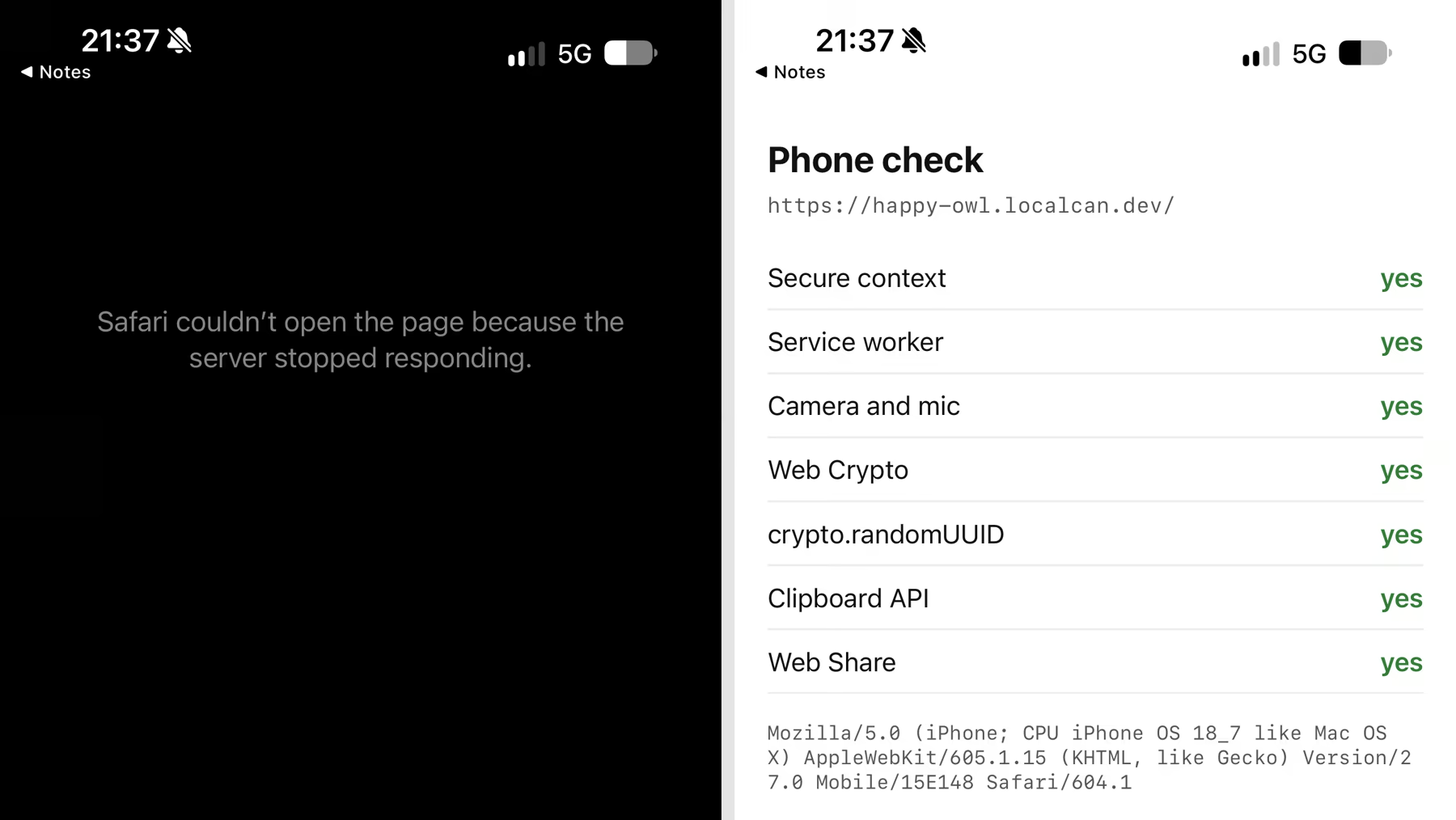
Vite's hot-reload WebSocket connected through the Public URL too, with the phone on 5G (a 101 response in the inspector).
Anyone with the link can open the dev server while the command runs. Press Ctrl+C when you're done, and the Public URL goes away.
How do I check which device and network a request came from?
Open the traffic inspector. Each captured request that went through LocalCan shows its client IP and headers, in the desktop app's Inspect traffic view and in localcan traffic. This is the phone's request on 5G:
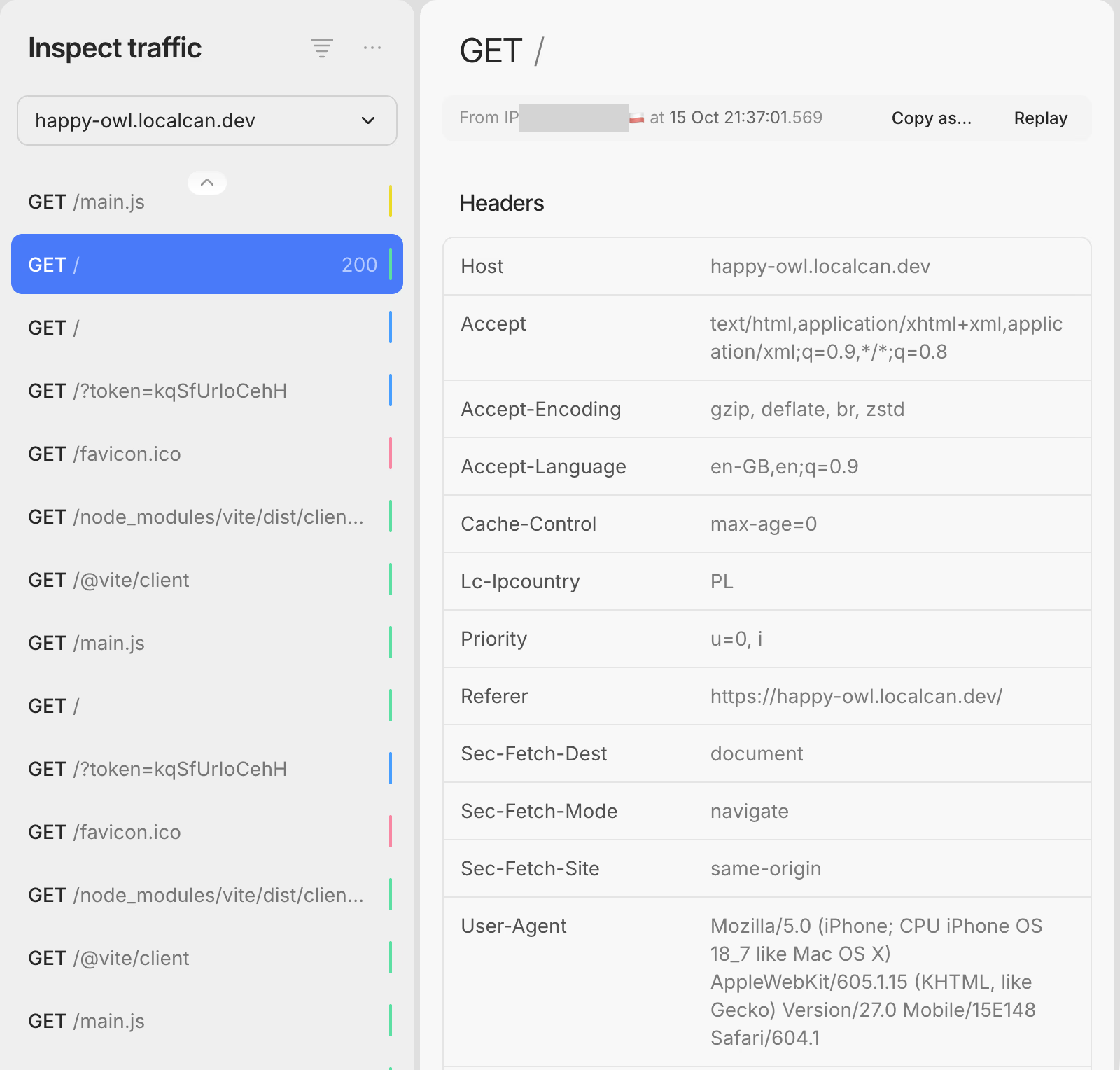
The same request as the CLI prints it:
$ localcan traffic get 18b336f3 --format http
# forwarded to http://localhost:5173/ · original client URL: https://happy-owl.localcan.dev/
GET / HTTP/1.1
Host: happy-owl.localcan.dev
accept: text/html,application/xhtml+xml,application/xml;q=0.9,*/*;q=0.8
accept-encoding: gzip, deflate, br, zstd
accept-language: en-GB,en;q=0.9
cache-control: max-age=0
lc-ipcountry: PL
priority: u=0, i
referer: https://happy-owl.localcan.dev/
sec-fetch-dest: document
sec-fetch-mode: navigate
sec-fetch-site: same-origin
user-agent: Mozilla/5.0 (iPhone; CPU iPhone OS 18_7 like Mac OS X) AppleWebKit/605.1.15 (KHTML, like Gecko) Version/27.0 Mobile/15E148 Safari/604.1
x-forwarded-for: <cellular IP>
x-forwarded-host: happy-owl.localcan.dev
x-forwarded-port: 443
x-forwarded-proto: https
x-real-ip: <cellular IP>
The client IP tells you which path a request took. On a Public URL, LocalCan's servers set x-forwarded-for, x-real-ip and lc-ipcountry from the connection and drop any value the visitor sent (headers LocalCan adds):
| The phone opened | Client IP LocalCan recorded |
|---|---|
| The LAN IP | No entry, the request goes straight to Vite |
The .local name, on Wi-Fi | 192.168.50.101, the phone's own address on the Wi-Fi |
| The Public URL, on Wi-Fi | The home connection's public IP |
| The Public URL, on 5G | The carrier's IP, country PL |
So when a page works on the phone and you're not sure the request came from it, check the IP and the user agent. Read the user agent with care: the iPhone on iOS 27.0 sends iPhone OS 18_7, and only Version/27.0 matches the installed version. Apple froze that number on purpose. A WebKit engineer wrote that all Apple platforms will report 18_7, "which should not change in the future" (WebKit bug 298260↗).
FAQ
How do I open localhost on an Android phone?
The LAN IP and the Public URL are network routes, so the steps are the same in Chrome on Android. I didn't test Android for this post, so I can't say whether Android resolves the .local name. With a USB cable, Chrome's port forwarding↗ maps a port on the phone's localhost to one on your computer, and a page opened as localhost counts as a secure context.
Can I open localhost in the iOS Simulator?
Yes, for layout and most APIs. The Simulator uses the Mac's network, so http://localhost:5173 opened in its Safari with Vite on the default bind and passed all seven checks. For the same reason it can't show you the Wi-Fi or cellular path a real phone takes.