
To password protect a prototype link, use the protection built into whatever hosts the prototype. A Figma prototype takes a password on any paid Figma plan. A Vercel deployment needs the Pro plan plus $20 per protected project per month. A Netlify site needs the $20-a-month Pro plan. A prototype still running on your laptop can sit behind a password page that a server checks before any request reaches your machine. The one approach that protects nothing, on any host, is a password prompt written in JavaScript inside the page.
Plans and prices were checked on 12 October 2026, and each section below links its source. An AI assistant helped draft this post. The commands and numbers come from my own runs.
Which plan do I need on each host?
| Prototype lives on | Where the password goes | Plan it needs | Without paying |
|---|---|---|---|
| Figma (design prototype) | The file's or the prototype's password setting | Any paid plan | None |
| Figma Sites or Make | The published site's settings | A paid plan (for the password) | None |
| Vercel | Deployment Protection, Password Protection | Pro, plus $20 per project per month | Vercel Authentication, one Shareable Link on Hobby, Basic auth in proxy.ts |
| Netlify | Project visibility | Pro, from $20 per month | None built in on Free or Personal |
| Your laptop | LocalCan Access control | Solo, $10 per month, and up | Basic auth, on every plan |
If you haven't picked a host yet, the wider question of where to share a prototype from is covered in how to share a vibe-coded app with a client.
How do I password protect a Figma prototype?
Figma can put a password on a whole design file or on selected prototypes inside it. It's available on all paid plans↗ and needs edit access to the file. A password on the file covers every prototype in it.
Figma never shows a password again after you set it, so copy it right away (you can reset it, not read it). And a password-protected file can't be opened from an embed↗, so a prototype embedded in a portfolio or a Notion page stops loading once it has a password.
Figma Sites and Figma Make apps take a password once they're published, on paid plans↗. A Site's password can cover the whole site or single pages, and one you type yourself needs at least 4 characters. For a Make app, the password protects only the published *.figma.site address. The preview version "is not password protected and follows standard file sharing permissions" (Figma help↗), so check who can open the file as well.
Can I password protect a Vercel deployment for free?
Not with a password. Password Protection↗ is not available on Hobby. Hobby has two free ways to keep a deployment private, and neither is a password. Vercel Authentication↗ lets in only Vercel users with access to the project, which a client usually isn't. A Shareable Link↗, which Vercel files under its ways to bypass protection, lets in anyone who has the URL with its secret query parameter, and Hobby allows one such link per account in total. Hobby is also for "personal, non-commercial use" (Vercel pricing FAQ↗), so a prototype for a paying client belongs on Pro either way.
On Pro, Password Protection costs $20 per protected project per month, on top of $20 per month for each Pro seat (Vercel pricing↗). Until 9 September 2026 it was sold only as a $150-a-month add-on for the whole team (Vercel changelog↗), so older forum answers quote that price.
Once it's on, Vercel asks for the password once per deployment and stores a cookie that works for that URL only. Every new preview URL asks again, and changing the password signs everyone out.
Can I add Basic auth to a Next.js app myself?
If the prototype is a Next.js app, it can check a password itself in its proxy file, which Next.js 16 renamed from middleware.ts to proxy.ts↗. It's plain Next.js, so it needs no paid Vercel feature:
import { NextResponse, type NextRequest } from 'next/server'

export function proxy(request: NextRequest) {
  const password = process.env.PREVIEW_PASSWORD
  const expected = 'Basic ' + btoa(`preview:${password}`)
  if (password && request.headers.get('authorization') === expected) {
    return NextResponse.next()
  }
  return new NextResponse('Password required', {
    status: 401,
    headers: { 'WWW-Authenticate': 'Basic realm="Preview"' },
  })
}
I tested it with next start on Next.js 16 (16.3.8), with PREVIEW_PASSWORD=correct-horse-battery:
$ curl -si http://localhost:3100/
HTTP/1.1 401 Unauthorized
content-type: text/plain;charset=UTF-8
www-authenticate: Basic realm="Preview"

Password required

$ curl -s -o /dev/null -w "%{http_code}\n" http://localhost:3100/_next/static/chunks/0cz1d0mv5g_q7.js
401
$ curl -s -u preview:wrong -o /dev/null -w "%{http_code}\n" http://localhost:3100/
401
$ curl -s -u preview:correct-horse-battery http://localhost:3100/ | grep -o "<title>[^<]*</title>"
<title>Acme checkout redesign v2 (confidential)</title>
With no matcher, the proxy runs on every request, so the JavaScript chunks sit behind the password too. The password && check keeps a missing environment variable from making the password the string undefined: with the variable unset, every request got a 401. Visitors see the browser's own login popup, with preview as the username. A Next.js static export has no proxy at all, so this only works for an app with a server.
On Vercel, Deployment Protection runs before the proxy, and new projects get Vercel Authentication by default (Vercel changelog↗). On a URL it covers, a client meets the Vercel login before this prompt. Standard Protection leaves the production domain out of it (Vercel docs↗).
How do I password protect a Netlify site?
On Netlify's current credit-based plans, a shared password is a Pro feature. Pro starts at $20 a month (Netlify pricing↗), and the password lives under Project visibility, where you choose "Production and previews" or "Previews only" (Netlify docs↗). Free and Personal ($9 a month) don't have it. The Basic-Auth rule in a _headers file is Pro and Enterprise only↗ as well. Enterprise, Open Source and legacy plans keep the older Password Protection settings.
Visitors get a generic password prompt, and it asks your own team members for the password too.
Can I password protect a page with HTML or JavaScript?
The cheapest answer in forum threads is a password check inside the page. In a latenode thread on password-protecting prototype links↗, an answer says basic JavaScript works for a client-side check, and suggests PHP for more secure validation. A check inside the page doesn't protect anything, because the browser has to download the whole page before the script can ask. Here is a test prototype with that kind of check:
<title>Acme checkout redesign v2 (confidential)</title>
<meta property="og:title" content="Acme checkout redesign v2 (confidential)">
...
<p>Pricing: Starter $29, Growth $79. One-page checkout, Apple Pay first.</p>
<script>
  if (prompt('Password') !== 'acme-preview-2026') {
    document.body.innerHTML = '<p>Access denied</p>';
  }
</script>
I published it at client-prototype.localcan.dev as a LocalCan Snapshot, a static copy served from LocalCan's servers, and fetched it with curl:
$ curl -s https://client-prototype.localcan.dev/ | grep -E "<title>|og:|Pricing|prompt"
  <title>Acme checkout redesign v2 (confidential)</title>
  <meta property="og:title" content="Acme checkout redesign v2 (confidential)">
  <meta property="og:description" content="New checkout flow for Acme, launching in Q1. Not for distribution.">
  <p>Pricing: Starter $29, Growth $79. One-page checkout, Apple Pay first.</p>
    if (prompt('Password') !== 'acme-preview-2026') {
Curl never runs the script, and neither does the bot that builds a link preview in a chat app. A crawler that does run it still finds the title and the og: tags in the head, which the script never touches. Requests sent with the user agents of Slack's, Facebook's and X's link-preview bots each got the full page with a 200: the confidential title, the description, the pricing line and the password itself. Paste a link like that into a chat and the preview can show the very title you meant to hide.
A password protects something only when a server checks it before sending the page. Every other option in this post does that. A password-protected short link has a similar gap: it guards the redirect, and anyone who has the target URL opens the prototype without it.
How do I password protect a prototype running on my laptop?
If the prototype exists only on your machine, as a dev server or a build folder, none of the hosts above are involved. LocalCan gives it a Public URL (also called a tunnel) and checks the password on LocalCan's servers (Access control). In the desktop app, click the URL, open Access Control and pick Password (the other protected mode, Secret link, makes the link itself the key). From the CLI, it's one command. Here is the same test prototype, protected:
$ localcan access password client-prototype.localcan.dev
Password: W8gYjW3cfVpn8bL8M5pP
client-prototype.localcan.dev is now password-protected. Share the password with whoever should have access.
The password page isn't up the instant the command returns: across four runs it took between 2 and 16 seconds, so a curl right away can still get a 200. After that, the same requests get nothing to read:
$ curl -sI https://client-prototype.localcan.dev/
HTTP/2 401
alt-svc: h3=":443"; ma=86400
cache-control: no-store
content-type: application/json
referrer-policy: no-referrer
server: LocalCan
www-authenticate: LocalCan-Gate
x-content-type-options: nosniff
x-frame-options: DENY
x-localcan-auth: challenge
x-robots-tag: noindex, nofollow
content-length: 60
date: Mon, 12 Oct 2026 19:16:25 GMT

$ curl -s https://client-prototype.localcan.dev/
{"error":"authentication_required","gate":"/.localcan/auth"}
Every path answers 401, including /index.html and /robots.txt. The response is marked noindex, nofollow and no-store, and the same three link-preview user agents got no title, no og: tags and no "Acme". A bot that asks for HTML gets the password page, whose only title is "Password required". A person gets this:
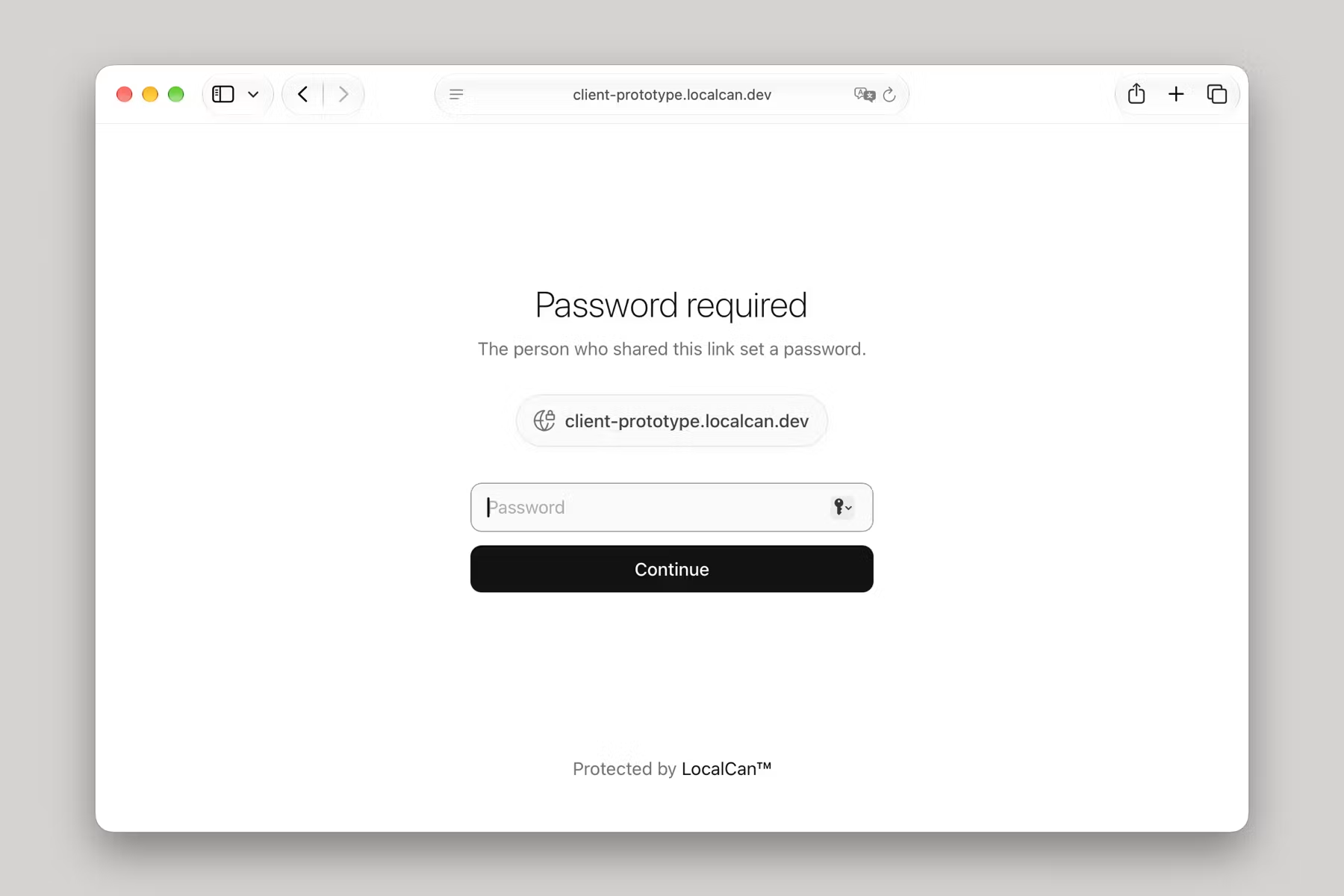
The right password sets a cookie for 7 days (Max-Age=604800), so a client types it once per browser per week. A wrong one shows "That password didn't work. Check it and try again." After five attempts in a few seconds from my Mac, the sixth got 429 Too Many Requests with retry-after: 12.
It works the same for a live dev server. I put a quick tunnel, localcan http 8765, in front of a local server, protected that URL, and sent five requests. All five got a 401, and the local server's access log didn't gain a line: refused requests never reach the laptop.
Because the check runs on LocalCan's servers, it keeps working when the laptop doesn't. On a Public URL you keep (one added in the app or a project file, not a quick tunnel), a Snapshot can answer while your machine is asleep, behind the same password. Basic auth, the free option on every plan, is checked by LocalCan on your machine instead: it stops with the tunnel, doesn't cover Snapshots, and shows the browser's login popup.
Access control is on LocalCan's subscription plans, from Solo at $10 a month or $96 a year (pricing). It's also what lets reviewers leave comments on a Snapshot.
How do I cut off access once the link is out?
Change the password. On Vercel, everyone has to enter the new one, and a Shareable Link stops working when you switch the deployment's Share setting back to "Only people with access" (Vercel docs↗).
On LocalCan, run localcan access password <url> again, or generate a new password in the app, and every visitor is signed out. It isn't instant: in three runs, visitors already signed in stayed in for 15.4 to 16.0 seconds, and the new password started working at about the same moment, which matches the "about 15 seconds" in the Access control docs. Wait 20 seconds before you send the new password.
The password has no expiry date of its own, so access ends when you change it. In Secret link mode, regenerating the link cuts off everyone who had the old one. To take the prototype down altogether, localcan tunnel rm <url> releases the Public URL and its Snapshot with it. Don't reach for localcan access clear <url> for this: it removes the password and makes the link public.