
The best moment of designing in code happens on a call. Last week I walked a client through a prototype vibe-coded with Claude Code on top of Vite. They asked for a tighter hero, I changed it while they talked, they refreshed, and we decided in ten seconds. No screenshots, no "I'll send a new version tomorrow." Then the call ended, I closed the laptop, and the link died with it.
That's the trade hiding inside every way of sharing a prototype. Deploy a copy to Vercel or Netlify and the link never dies, but it's frozen at your last deploy: every round of feedback becomes another rebuild. Share the app live from your machine and the loop is instant, but the link is your laptop.
If you just built something real with Claude Code, Codex, or Cursor, this is the guide I wish I had: how to share a vibe-coded app with a client, and which side of that trade each option picks, and where the client's feedback ends up: on the page, or in screenshots and chat. It's not a niche question anymore. Figma's own 2026 AI Report↗ found the share of designers participating in development doubled in a year, from 21% to 41%.
First, figure out what you actually built
Everything below sorts by one question: does your app need a server at view time?
A Vite, Astro, or plain React prototype usually builds into a folder of files (dist or build) that any host can serve. If that describes your app, every option in this guide is open to you.
Next.js is the one to watch: it can produce the same kind of static folder with output: 'export', but if your prototype has API routes, saves form input, or logs people in, it needs a running server, and static sharing options will serve pages where those features silently fail.
You don't need to read the code to find out. Ask the agent that built the app: "Does this run from a static build? If not, what breaks?" That one answer tells you which options below apply.
Every option at a glance
Everything in this table is true as of September 2026. Pricing and fine print change fast, so each section below links to the source.
| Option | What you share | Free tier catch | Laptop off? | Custom domain | Feedback on the page |
|---|---|---|---|---|---|
| Figma prototype link | A clickable design, not the app | Link exposes source file, password is paid | Yes | No | Yes, on the design |
| Figma Make / Sites | App rebuilt inside Figma | Publishing needs a paid seat | Yes | Paid | Yes, on the design |
| Lovable | App rebuilt in Lovable | Permanent "Edit with Lovable" badge | Yes | Paid | No |
| v0 / Bolt / Replit | Your GitHub repo | Builder badge on page, Replit free = 1 app | Yes | Paid | No |
| Claude artifacts | One self-contained page | No routing, no backend | Yes | No | No |
| ChatGPT Sites | Codex project | Paid ChatGPT plans only | Yes | Not documented | No |
| Vercel | Built app (server features work) | Hobby is non-commercial use only | Yes | Yes, free | Yes, via the Vercel Toolbar, commenters need a Vercel account |
| Netlify Drop | Static build folder | Claim within 1 hour, 300 credits/mo | Yes | Yes, free | No |
| GitHub Pages / Cloudflare Pages / Surge | Static build | Public repo (GH), 1,000-file cap (CF drop) | Yes | Yes, bring a domain | No |
| ngrok free | Live localhost | Visitors click through a warning page, one-time $5 credit | No | Paid | No |
| Cloudflare Quick Tunnel | Live localhost | New random URL every run, no uptime promise | No | No | No |
| LocalCan | Live localhost or a deployed Snapshot | Free plan: one URL at a time, 60-minute sessions | Yes (Snapshot) | Yes | Yes, on the Snapshot, reviewers need a free account |
Read two columns first: what you're actually sharing (a frozen copy or the live app) and whether the link survives your laptop closing. Almost nothing gives you both.
If the client can wait: stay in Figma
For pure design feedback, a Figma prototype link is still the fastest clean link on this page. Open the prototype, click Share prototype, set access to "Anyone", and the client views it in the browser with no Figma account↗.
Two catches. First, it is not your app. Only the hotspots you wired respond, and clients reliably click a dead area and report it as a bug. Second, on the free Starter plan a prototype-only link still lets viewers open the full source file, and password protection is paid-only.
What about hosting the real app in Figma? There is no import path. Figma Make and Figma Sites publish only what was built inside Figma, so your Claude Code project would have to be rebuilt there. Publishing a Make app requires a paid Full seat↗ ($16/month billed annually), unless you also publish the file to Figma Community, which makes it publicly remixable. The published URL is a random three-word *.figma.site subdomain that cannot be changed↗, and custom domains are a paid feature.
Figma is great right up until your prototype becomes real code. Which is why you're here.
AI builders that host for you
"The tool that built my app can also publish it" is true only if the app was built there.
Lovable's publish flow is genuinely a single Publish dialog, published links don't expire↗, and viewers need no account. But there is no way to import existing code↗: "currently there is no way to start a Lovable project from already existing code [...]". For an app you built locally, Lovable means rebuilding it inside Lovable. The free tier also stamps a permanent "Edit with Lovable" badge on every published page, and a published site is a manual copy: edits don't go live until you click Update again.
v0, Bolt, and Replit will take an existing app, but only through GitHub↗. If you've never pushed a repo (a copy of your project's code hosted on GitHub), that's a detour. And if you work somewhere with a private GitHub organization, it's a bigger one: an admin has to add you to the org, often on a paid seat, before you can push anything. Free tiers put the builder's branding on your page ("Built with v0", "Bolt branding on websites"), Replit's free plan publishes exactly one project↗, and v0's free deploys run on Vercel's Hobby plan, which brings us to the non-commercial clause in the next section.
The chat tools themselves? A published Claude artifact↗ is free to share and needs no viewer account, but an artifact is one self-contained page: no routing, no backend, so a multi-route Vite app doesn't fit. ChatGPT Sites hosts real apps on OpenAI's infrastructure and gained a public anyone-with-the-link mode in July 2026, but it needs a paid ChatGPT plan↗, sharing starts at invite-only, and workspace admins can restrict public links.
The pattern across all of these: if the app was built on your machine, none of them will host it without a rebuild or a GitHub detour.
The default answer: Vercel and Netlify
Ask in any forum and the answer is "push to GitHub, connect Vercel." It works, and for a Next.js app with real server features it's the strongest option here. The fine print is where client work gets caught.
Vercel's CLI (a command-line tool your coding agent can run for you) can deploy a local folder without git: run vercel in the project directory. Two things before you paste the link into a client email. First, the URLs the CLI prints are deployment URLs, and on new projects those sit behind a Vercel login wall by default↗: your client hits a Vercel sign-in, not your prototype. Run vercel --prod, then share the production domain from the dashboard (my-app.vercel.app), which stays public. Second, the Hobby plan is "restricted to non-commercial, personal use only"↗, and Vercel's own definition of commercial includes a paid consultant being paid to create the site. A prototype for a paying client belongs on Pro at $20 per user per month↗. Vercel also has a good feedback loop of the deploy hosts: with the Vercel Toolbar on, a reviewer can pin a comment to the page, though every commenter needs a Vercel account.
Netlify is friendlier on both counts. Netlify Drop↗ is the fastest no-git path in this post: run npm run build, drag the dist folder onto the Drop page, and the site is live at my-app.netlify.app. And Netlify staff explicitly allow commercial use on the free plan↗: you can charge clients for your work, you just can't resell Netlify hosting. The catches: Drop serves static builds only, an anonymous drop is deleted unless you claim it within one hour↗, password protection needs the $20/month Pro plan↗ (see how to password protect a prototype link on every host), and the free plan is a hard 300 credits per month↗. Production deploys cost 15 credits each, bandwidth 20 credits per GB, and when credits run out all your sites show an error page until the month resets. Every design tweak is also a manual rebuild-and-re-drag.
One more thing for teams: both free tiers are single-user. Netlify's free plan can't add teammates↗, and Vercel Hobby allows one external collaborator↗, so an agency where several designers share client prototypes is on per-seat paid plans from day one, usually with GitHub org seats to provision on top.
Free if you don't mind the setup: GitHub Pages, Cloudflare Pages, Surge
These are truly free and great for the viewer: plain public URLs, no login walls, always online. They're also built for people who already deploy things.
GitHub Pages requires a public repository on the free plan↗, which means your client prototype's source code becomes public too, and GitHub prohibits using Pages to run a business, e-commerce site, or SaaS↗. The classic trap: project sites live at username.github.io/repo/, so a Vite or Astro build shows a blank page until you set base: '/repo/'↗ in the config. Cloudflare Pages has a drag-and-drop upload↗ capped at 1,000 files, otherwise it wants a git repo. Surge is CLI-only and still actively maintained↗, with password protection at $30/month.
Your coding agent can handle the setup. The real cost is the frozen-copy loop: every "can you nudge that spacing" round trip is a rebuild and redeploy.
Tunnels: share localhost with a client
All the options so far share a copy of your app. A Public URL does something different: it forwards visitors through a live connection (a tunnel) to the dev server running on your machine. The client sees the app exactly as it is right now. For live review sessions, nothing else comes close.
The structural weakness is that the link is your laptop. Laptop sleeps, Wi-Fi drops, dev server crashes overnight: the client in another time zone gets an error page at what is 3am for you. That's how my call in the intro ended, and with one exception below, every tunnel carries it.
The free tiers add their own friction. ngrok's free tier shows every visitor an interstitial warning page↗ before your prototype ("You should only visit this website if you trust whoever sent the link to you"), which is an alarming first impression for a client, and the free tier is now a one-time $5 usage credit↗: once it's spent, your endpoints stop until you pay. Cloudflare's Quick Tunnels↗ are genuinely free with no account, but the URL is random on every run, and Cloudflare says plainly: "We don't guarantee any SLA or uptime," it's for testing. And localtunnel hasn't shipped a client release since 2021↗ and now asks your visitors to type your public IP address as a password, which is not a link you send a client.
For a deeper look at how tunnels work, I wrote a complete guide to local tunneling.
LocalCan: a Public URL with a deployed Snapshot
LocalCan has a desktop app (macOS, Windows and Linux) that gives your dev server a stable Public URL like my-portfolio.localcan.dev, or your own custom domain. No visitor interstitial, no login wall, and the URL doesn't change between sessions (paused URLs stay reserved for 7 days, custom domains are permanent).
A Snapshot is a deployed copy of your app, published from the app in one click and served at your Public URL. The same URL can run the live tunnel when you want the client to watch changes land as you make them.
See otsu.localcan.dev↗, a pixel-effect generator I vibe-coded and published as a Snapshot.
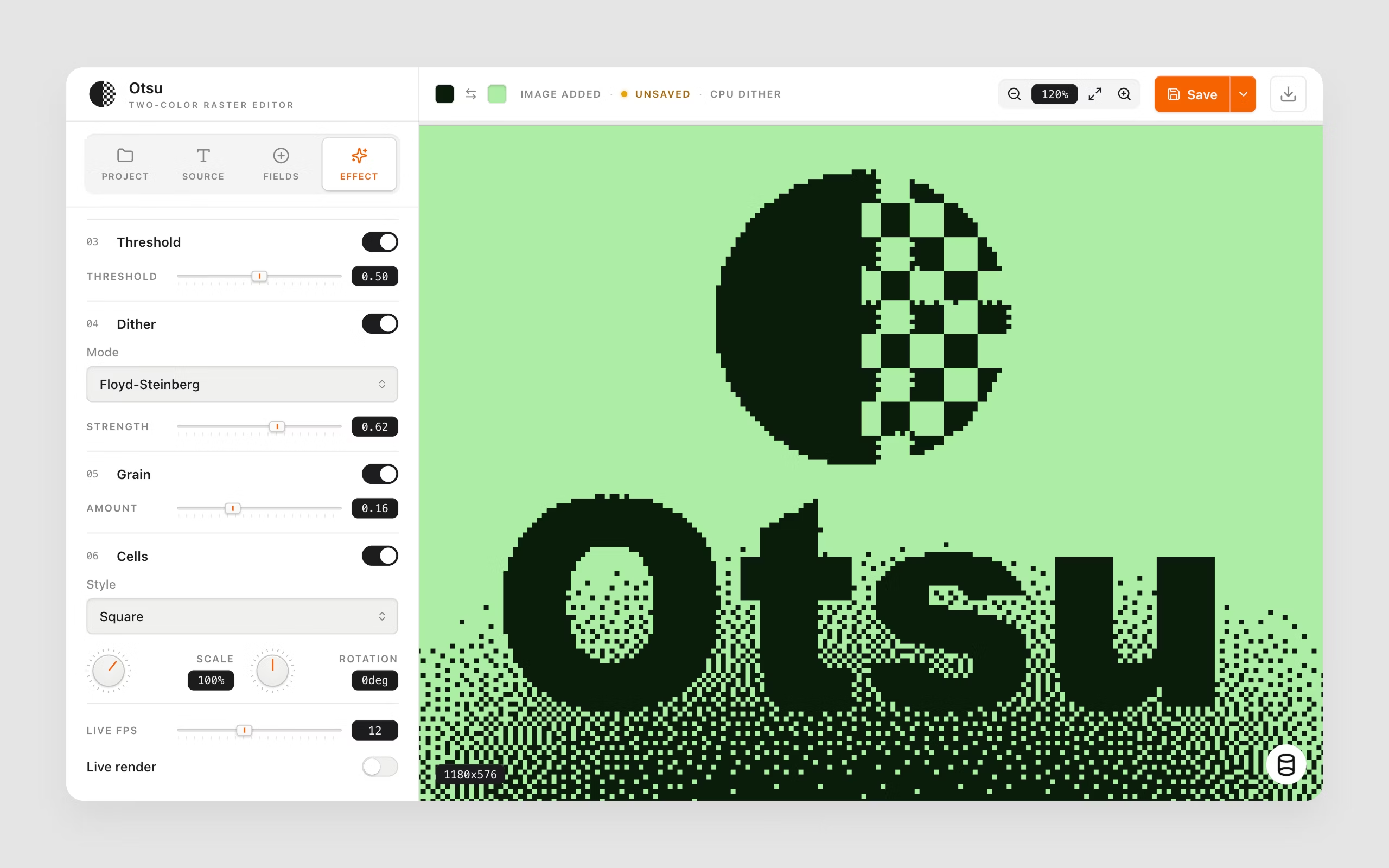
In practice, one link carries the whole review cycle. Publish a Snapshot and send the link. On a call, run the live tunnel on the same URL and the client watches changes land as you make them. Between calls they revisit the same link and work async. When you've made changes, click Update and the deployed copy moves on. No separate host, no second staging link to explain.
That Publish is one click on macOS: LocalCan finds your app, runs its own build (Vite, React, Vue, Svelte, Astro, and Next.js static export), and publishes the output. If you only have a built folder and no running app, drag it onto LocalCan and it mints a new Public URL that serves it. On Windows you build yourself and pick the output folder. There's no git anywhere in this flow: the folder on your laptop is enough, with no repo to create and no GitHub org access to request. Snapshots never refresh on their own, and the app shows how old the published copy is.
Comments: the feedback lands on the page
The other half of the trade was feedback. Once the Snapshot has comments on, the same link is the review link. The client opens it, clicks the spot they mean, and a numbered pin with their note lands in the Comments inbox in the app. They get your replies by email, you fix the work, click Update, and the pins stay on their elements on the new version, marked when the words under them changed. Reading needs nothing. Posting needs a free LocalCan account, not a seat, and comments need Access control, which is why one protected link does the whole job.
Because the comments are data rather than screenshots, your coding agent can work through them: read the open threads with the exact element each pin points at, make the changes, republish, and reply on each pin. I run that from Claude Code through LocalCan's MCP server, and it's the part that makes designing in code with a client feel finished. Details in the Comments docs.
For a design agency, the Teams plan covers every designer under one subscription, with client links on the agency's own domains (client-project.my-agency.com) instead of a vendor subdomain. Client reviewers comment with a free account, so they never cost a seat.
The Free plan gives you one Public URL at a time in short sessions, Snapshots included. A stable address, custom domains, Access control, and comments are on paid plans, with a 14-day trial and no credit card. A Snapshot is static output only: no server rendering, API routes, form handling, or websockets in the deployed copy, and a Next.js app needs output: 'export' just like on Netlify Drop. Protect a client link with Access control rather than the older Basic Auth prompt, since only Access control covers the Snapshot. If your prototype needs a server, a deploy host is the right tool, not a Snapshot.
Which one I'd actually pick
For pure design feedback, send the Figma prototype link and skip deploying entirely. For a one-off static prototype with zero budget, Netlify Drop is honestly hard to beat: claim the site within the hour and the link persists. For a real Next.js app with server features built for a paying client, pay for Vercel Pro and be done with it. For the call-then-async rhythm, where the same link runs live on a call and serves a deployed Snapshot the rest of the time, publish from the app, let your coding agent run the builds, and let the client's feedback land as pins on the page instead of screenshots in Slack. And for an agency with several designers and client prototypes in flight, LocalCan Teams puts everyone on one plan with client links on your own domains.
FAQ
How do I share a Claude Code app with a client?
Build it (npm run build) and drag the output to Netlify Drop for a permanent static copy, or put a Public URL in front of your dev server for live review. Claude Code can run the build and deploy commands itself if you ask.
How do I share localhost with a client?
Put a Public URL in front of your dev server and send the link. The catch: it only works while your machine is awake and online, unless a Snapshot backs it at the same URL.
How do I collect feedback on a prototype from a client?
If it's still a design, Figma comments. On a real app, comments on a LocalCan Snapshot, where reviewers pin notes on the page with a free account and your coding agent can act on them, or Vercel's toolbar, where each reviewer needs a Vercel account.
Can I deploy a prototype without git or a hosting account?
Yes. Netlify Drop takes a built folder. LocalCan publishes a Snapshot from the app in one click, building it for you on macOS, at a URL you can also use for the live tunnel.
Can I use the Vercel Hobby plan for client work?
No. Vercel's fair use guidelines restrict Hobby to non-commercial personal use, and their definition of commercial explicitly includes being paid to create the site. Client work belongs on Pro. Netlify, by contrast, allows commercial use on its free plan.
How do I share a prototype with a client without Figma?
Once the prototype is real code, share the running app itself: a static host for a fixed copy, or a Public URL for the live dev server. Either way your client just opens a link, no design tool account needed.
How do I share a website made with AI?
If it's a single page, publish it straight from the chat as a Claude artifact. If it's a real multi-page app, build it and use a static host like Netlify Drop, or put a Public URL in front of the dev server. First ask the agent that built it whether it runs from a static build.
How long does a Netlify Drop link last?
Indefinitely once you claim the site with a free account. Anonymous drops are deleted after one hour, and all free-plan sites go offline for the rest of the month if the 300 monthly credits run out.
What should a design agency use to share client prototypes?
The free tiers of the main deploy hosts are single-user, so an agency is choosing between per-seat team plans. Compare what the team plan actually buys: seats for every designer, custom domains per client, and whether a shared link survives one designer's laptop going to sleep.
That's every real option I know of. If one link for the call, the async round, and the closed laptop sounds like your rhythm, LocalCan has a 14-day trial, no credit card. Either way, stop making clients choose between a stale copy, a dead link, and feedback by screenshot.