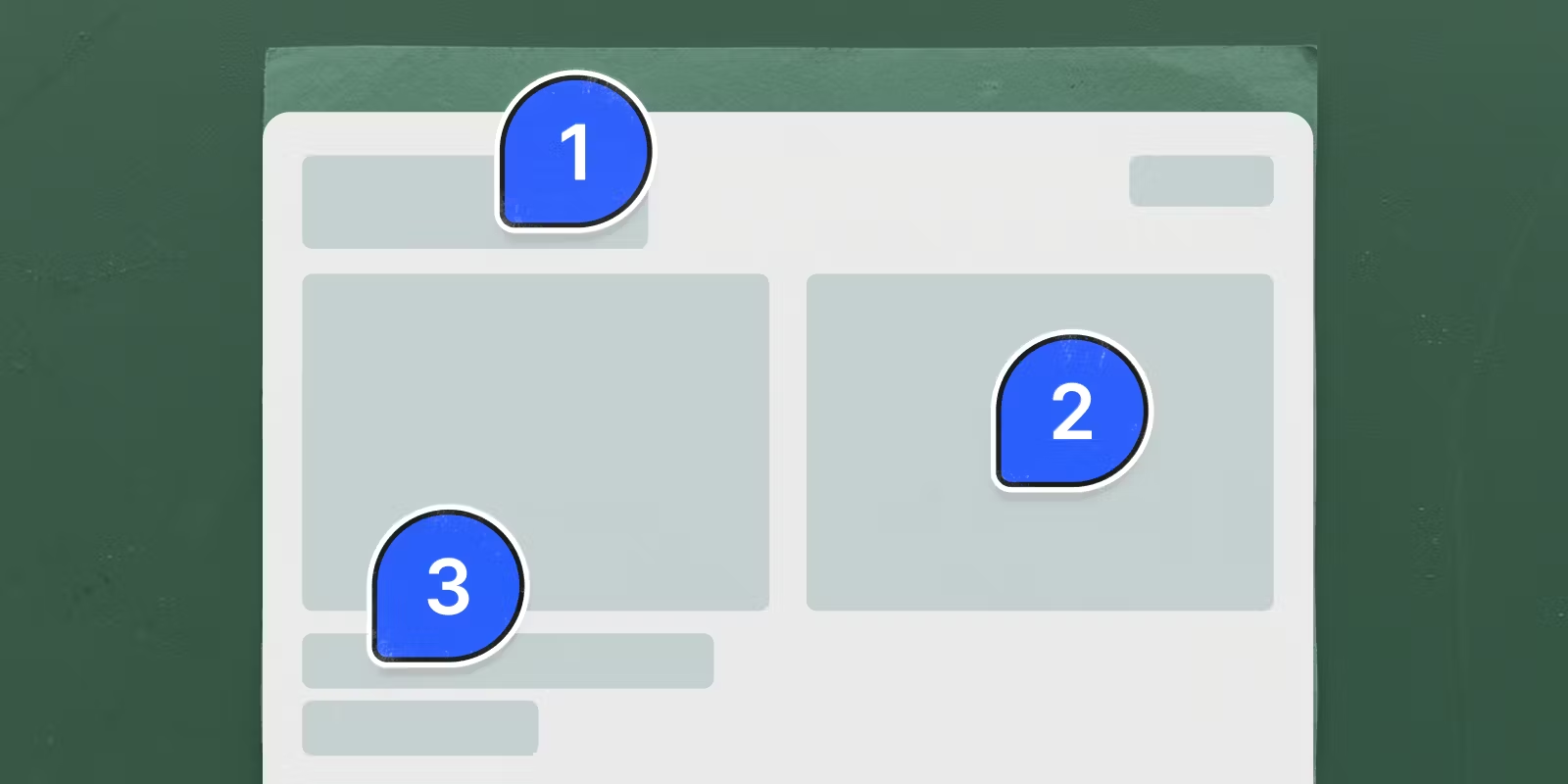

To get feedback on a website prototype, put it behind one link the reviewer can open, tell them what kind of feedback you want, and have them pin each comment on the page instead of sending screenshots in chat. A pinned comment keeps the four things a screenshot loses: the page, the element, the screen width and the version it was left on. Where those comments live depends on where the prototype lives. A Figma prototype takes Figma comments, a Vercel preview takes comments in Vercel's toolbar, a site you can add a script to works with a tool like BugHerd or Ybug, and a build still on your laptop can collect comments on a LocalCan Snapshot.
Pinned comments are for a client or a teammate marking up a page that's built. If you want to learn whether strangers understand the idea at all, watch a few people use the prototype, or put a short survey on the link with a tool like Qualaroo↗, which shows its questions on a Figma or staging link.
To show what each step produces, I ran one full review round on a throwaway landing page: four comments, a fix, a republish, replies and the emails they trigger. The reviewer is a second LocalCan account I signed in with, not a client. Plans and prices were checked on 20 October 2026. An AI assistant helped draft this post. The commands and numbers come from my own runs.
What should I send reviewers with the prototype link?
A reviewer who doesn't know what you're asking sends general impressions. Send these with the link:
- How to get in. The link, and the password if there is one. For client work, protect the link before you send it. The password options per host differ a lot.
- What's not finished. Placeholder copy, prices and photos you know about, so nobody spends comments on gaps you've already seen.
- Two or three questions. "Is it clear what we sell from the first screen?" gets a better answer than "thoughts?".
- Where and by when. Ask for one comment per issue, on the spot it's about, by a set date, and for a look on their phone too.
A message that covers them:
Here's the first version of the new homepage:
https://bakery-prototype.localcan.dev (password in the next message)

The copy is a first draft. The plan prices should be final.
Three questions:
1. Is it clear from the first screen what we deliver and when?
2. Do the three plans match what we agreed?
3. Does anything look broken on your phone?

Click the spot you're commenting on so I know which part you mean.
I'd like to collect everything by Thursday.
What should a comment on a prototype record?
A comment is fixable when you can find the exact spot it's about and see what the reviewer saw. That takes four things: the page, the element, the screen width and the version of the prototype. A screenshot in chat carries the pixels and none of the rest. You guess the width from the image, you never learn which element the arrow points at in your code, and after two rounds nobody knows which version a screenshot came from.
Width is the one that bites. In my test round, the reviewer left this comment from a phone-sized window:
On my phone the menu is gone, only Order is left. Can How it works and Plans stay up here?
On a laptop the menu is right there, so the comment reads as wrong. Here is what the pinned version recorded:
$ localcan comments show bakery-prototype.localcan.dev '#4'
Thread:    #4
Status:    open
Author:    Client Reviewer
Posted:    just now
Page:      /
Selector:  header.nav
Viewport:  390×844
Version:   1

On my phone the menu is gone, only Order is left. Can How it works and Plans stay up here?
The viewport line explains the comment on its own, since the nav links in this prototype are hidden below 720 pixels. The selector names the element in the code, and the version says which publish it was about. Whatever tool you pick, check that it records these four things before your reviewers start.
Where should reviewers leave comments?
Use the comments built into wherever the prototype already lives. The tool that fits depends on the host, and so does what your reviewer has to sign up for.
| Prototype lives on | Where reviewers comment | What the reviewer needs | What it costs you |
|---|---|---|---|
| Figma | Figma comments on the prototype | Signed in to Figma, view access | Any Figma plan |
| Vercel (preview deployment) | Comments in the Vercel Toolbar | A Vercel account | Included on all plans |
| A site you can add a script to | BugHerd, Ybug and similar tools | No account (BugHerd and Ybug) | BugHerd from $42 a month, billed yearly |
| Your laptop (static build) | Comments on a LocalCan Snapshot | A free LocalCan account | From $10 a month or $96 a year (Solo), since comments need Access control |
If the prototype is a Figma file, stay in Figma: anyone signed in to Figma with view access↗ can comment on a prototype, on any plan according to Figma's comments guide↗. Comments aren't displayed when the prototype's toolbar and footer are hidden, so leave them on when you share the link.
Vercel turns Comments↗ on by default for preview deployments, free on every plan, and they pin to any part of the page. Every commenter needs a Vercel account, and on Hobby you can invite people outside your team↗ one collaborator at a time.
For a site you can change, the dedicated feedback tools add a script tag or a browser extension. BugHerd↗ uses a one-line JavaScript tag or an extension and starts at $42 a month billed yearly ($50 billed monthly) for 5 members. Ybug↗ works the same way. Both let clients comment without an account.
If the prototype is a folder on your laptop, a static export, or something an AI tool generated that you haven't deployed anywhere, none of the above fits without deploying it first. For the hosting side of the same choice, see how to share a prototype with a client.
How do I collect pinned comments on a prototype that's still on my laptop?
Publish the folder as a Snapshot, protect it, and turn comments on. A Snapshot is a static copy served at a Public URL (also called a tunnel), so the link works while your laptop is closed and the prototype needs no script for the comments. My test prototype was a landing page for a made-up bread subscription, one HTML file and one stylesheet:
localcan snapshot publish ./bakery-prototype --name bakery-prototype
Publishing…
https://bakery-prototype.localcan.dev
2 files · 5 KB
Comments won't switch on for a public link:
$ localcan snapshot comments bakery-prototype.localcan.dev on
error: Comments require an Access policy (secret link or password) on this URL.
Protect the URL first (e.g. `localcan access password bakery-prototype.localcan.dev`), then turn comments on.
The gate is there because whoever can open the Snapshot can comment, so the feedback is only as private as the link. Access control puts a password page or a secret link in front of it, and it's on subscription plans only, which is why comments are too. With a password set, comments turn on:
localcan access password bakery-prototype.localcan.dev
localcan snapshot comments bakery-prototype.localcan.dev on
The reviewer opens the link, types the password, and gets the page with a small toolbar at the bottom. Reading pins needs nothing more. To post, they click Sign in once (it lasts 7 days for that Snapshot), use an email code, Google or GitHub on localcan.com, give their name if the account is new, and confirm that their name and photo will show on the page. In my run the code email arrived within seconds. After that they pick the comment tool, click the element, type and press Enter.
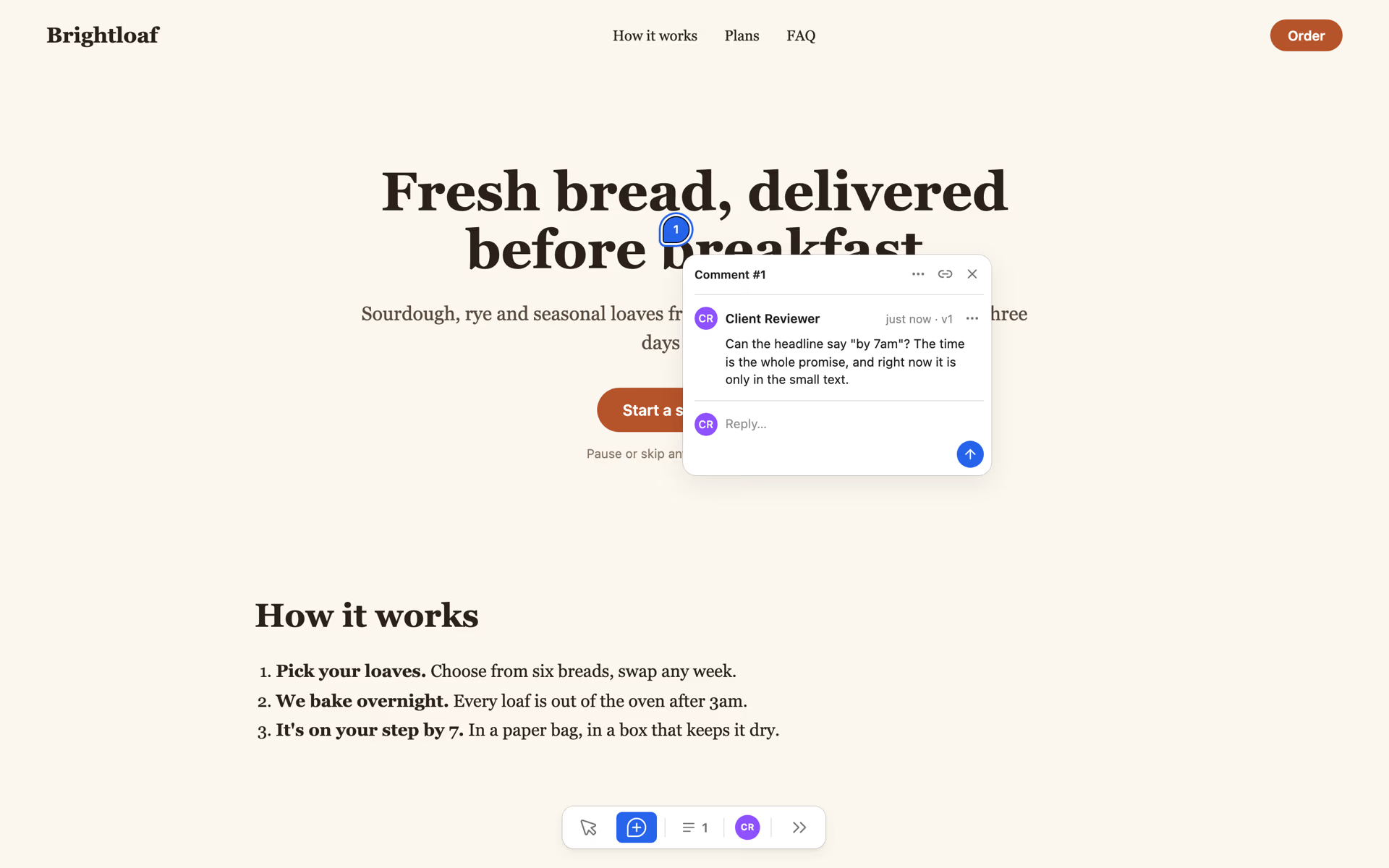
The reviewer left four comments, three at desktop width and one at phone width. On my side they arrive in the app's Comments view, or in the terminal:
$ localcan comments ls bakery-prototype.localcan.dev
#   STATUS  AUTHOR           AGE       PAGE  REPLIES  BODY
#1  open    Client Reviewer  just now  /     0        Can the headline say "by 7am"? The time is the whole promis…
#2  open    Client Reviewer  just now  /     0        Is $29 right for Household? I thought we agreed on $27 for …
#3  open    Client Reviewer  just now  /     0        This quote is made up, right? We need a real customer here …
#4  open    Client Reviewer  just now  /     0        On my phone the menu is gone, only Order is left. Can How i…
Comments are on LocalCan's subscription plans, from Solo at $10 a month or $96 a year (LocalCan pricing), and labelled beta in the review panel. Reviewers never need a plan, only the free account. A Snapshot is static output, so a prototype that needs a server for forms or API routes belongs on a host like Vercel, with its own comments.
What happens to the comments when I change the prototype?
Open threads carry over to the new version, and each pin re-attaches to its element if that element still exists. I changed the headline to "Fresh bread on your step by 7am", set the Household price to $27, deleted the testimonial section, and left the phone menu alone. Then I republished and answered three threads:
localcan snapshot update bakery-prototype.localcan.dev
localcan comments reply bakery-prototype.localcan.dev '#1' "Moved 7am into the headline in the new version. Does it read better?"
localcan comments reply bakery-prototype.localcan.dev '#2' "Fixed, Household is \$27 now."
localcan comments resolve bakery-prototype.localcan.dev '#2'
localcan comments reply bakery-prototype.localcan.dev '#3' "Yes, it was a placeholder. I took the section out until we have a real quote."
On version 2 each pin landed differently:
- Pin 1 re-attached to the new headline, with a ring around it, and the comment list marks it "text changed". The reviewer can see the words they commented on are gone.
- Pin 2 left the page, since resolved threads are hidden by default.
- Pin 3 lost its element. It's drawn hollow at the spot where the testimonial used to be and marked "approximate". The page got shorter, so that spot now falls on the Household plan's button, which has nothing to do with the comment. Treat a hollow pin as a pointer to read the thread, not to the element under it.
- Pin 4, left on the header at 390 pixels wide, shows on the desktop layout next to the FAQ link. The recorded width is what tells you it's about the phone layout.
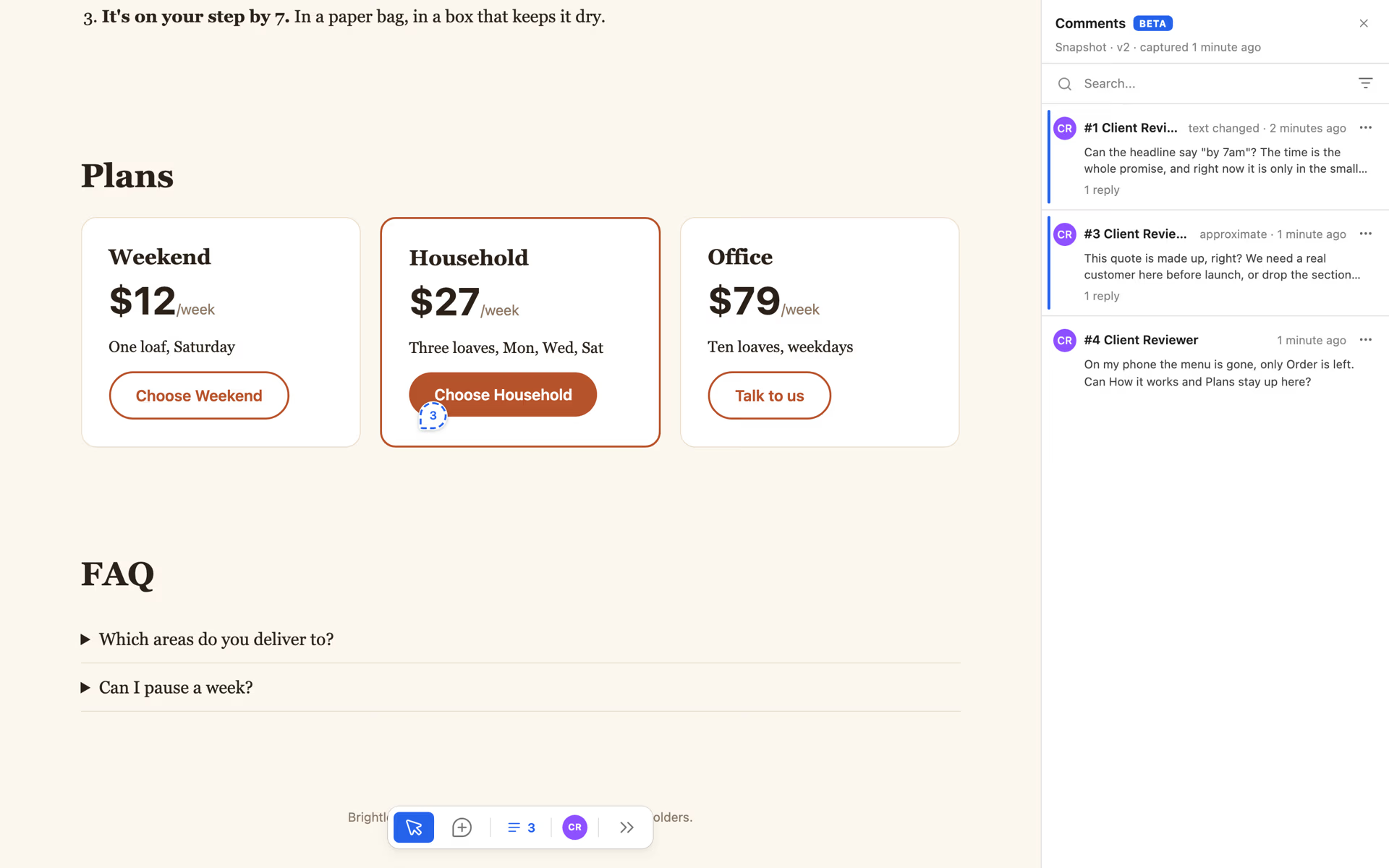
The reviewer hears about the replies and the resolution by email. Comment email goes out on a timer, not the moment you reply. In my run the three replies and the resolution reached the reviewer's inbox 12 minutes after I posted them, as four separate emails. Each reply email has the subject <your name> replied on bakery-prototype.localcan.dev, quotes the reply, and has an Open the thread button that lands on the pin. The resolution email quotes the reviewer's own comment and adds "Reopen it from the page if this still needs work." Every one carries an unsubscribe link, so a client who wants fewer emails can turn them off without asking you.
Can a coding agent work through the feedback?
Yes, because a pinned comment is data. An agent connected to LocalCan's MCP server reads the open threads with list_comments. This is part of what it got for thread 2:
{
  "num": 2,
  "version_seq": 1,
  "body": "Is $29 right for Household? I thought we agreed on $27 for three loaves.",
  "page_path": "/",
  "anchor": {
    "target": {
      "selector": "div.card-featured > p.price",
      "quote": { "exact": "$29/week" }
    }
  },
  "client_meta": { "vh": 900, "vw": 1440, "dpr": 2 }
}
The selector and the quoted text "$29/week" are enough to find the line in the source without opening a browser. From there the loop is the same as by hand: change the code, update_snapshot, then reply_comment and resolve_comment per thread, once you've given the MCP server write access with localcan mcp access read_write. The agent can't start threads, and reading never marks anything read, so the inbox stays yours. The Comments docs cover the rest, including the email digest you get as the owner and the switches for it.
FAQ
How do I give useful feedback on a website?
Say what you expected and what you saw instead ("I expected the price to be $27, it says $29"), and mention the device if it's a phone problem. Leave each point on the spot it's about. A list of ten points in one message is hard to act on, because each point has to be found again on the page.
Is there a free website annotation tool?
Any screenshot markup tool is free and works on any page. Write the page, the element, the screen width and the version next to each screenshot, since the image carries none of them.