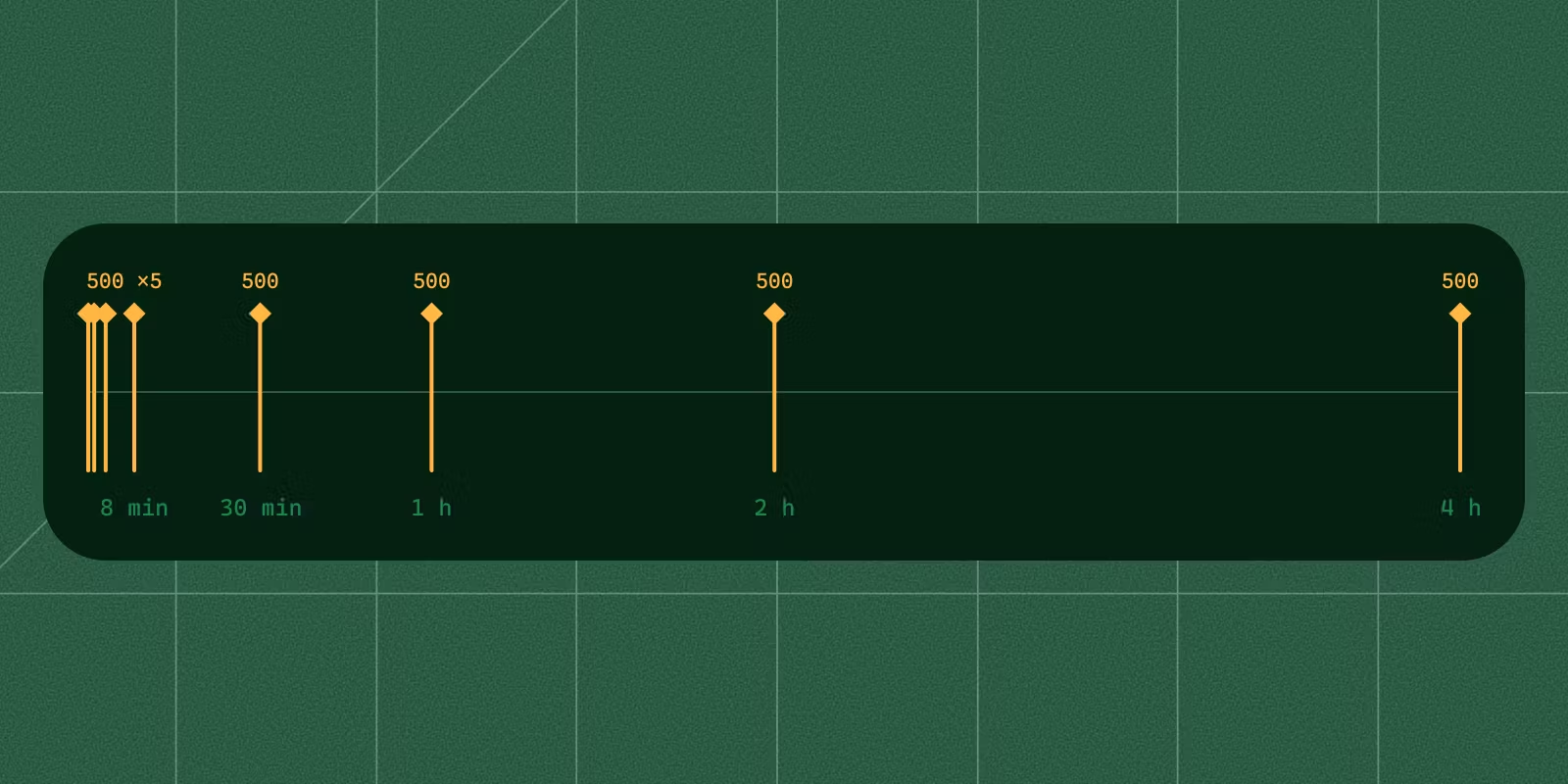

A Shopify webhook that never fires has a short list of causes, and the fastest way to tell them apart is to see whether Shopify sent anything at all. If nothing arrives, the subscription was never created (a missing access scope and missing protected customer data access both fail quietly, with HTTP 200) or it points at a URL that no longer exists. If deliveries arrive but your app misses them, your handler answered with an error, a redirect or too slowly. If they arrive with fields missing, check the payload's API version and the protected customer data fields. If they stopped after working for a while, check the URL first, then whether Shopify deleted the subscription. Put a request inspector between Shopify and your handler, and each of these looks different.
Everything below was run on 26 and 27 October 2026 against a Shopify development store, with an app created in the Dev Dashboard on Webhooks API version 2026-10, LocalCan 3.3.2 (CLI and daemon 1.3.2), and the Node handler from the Shopify webhooks guide, which verifies the HMAC and answers 200. An AI assistant helped draft this post. The commands and numbers come from my own runs.
Did Shopify send anything?
Shopify's side of the answer is in the Dev Dashboard under your app's Logs: deliveries from the past 7 days, filterable by topic, status and shop, each with its response, response time and delivery attempt. The data can lag by several minutes (Troubleshoot webhooks↗).
Your side is a public HTTPS URL whose requests are recorded before your code runs. With LocalCan, one command gives your local port a Public URL (also called a tunnel), and the traffic inspector records every request that reaches it:
localcan http 3000
I subscribed that URL to products/create and created a product through the Admin API. The delivery reached the inspector about 2 seconds later (the inspector lists local time, an hour ahead of the UTC times in the headers). The 401 below it is an unsigned curl I sent first, which the handler rejected:
$ localcan traffic ls --host cool-falcon.localcan.dev
ID        TIME      METHOD  STATUS  DUR  PATH       HOST
c1fcce32  22:16:35  POST    200     6ms  /webhooks  cool-falcon.localcan.dev
2de07659  22:16:22  POST    401     8ms  /webhooks  cool-falcon.localcan.dev
$ localcan traffic get c1fcce32 --format http
# forwarded to http://localhost:3000/webhooks · original client URL: https://cool-falcon.localcan.dev/webhooks
POST /webhooks HTTP/1.1
Host: cool-falcon.localcan.dev
[accept, accept-encoding, lc-ipcountry, x-forwarded-* and x-real-ip headers trimmed]
content-length: 1266
content-type: application/json
user-agent: Shopify-Captain-Hook
x-shopify-api-version: 2026-10
x-shopify-event-id: 7f51310c-86ed-4c34-8828-9260271bcc3e
x-shopify-hmac-sha256: cKSzZeO1vZ0rWAKJTsaPV6Y99HniABs5vb6+BU/9gak=
x-shopify-product-id: 10559155241243
x-shopify-shop-domain: localcan-webhook-test.myshopify.com
x-shopify-topic: products/create
x-shopify-triggered-at: 2026-10-26T21:16:33.766219916Z
x-shopify-webhook-id: 6baee1e1-a770-5aca-9b9b-991fd72eda2a

[1,266-byte JSON body trimmed]

HTTP/1.1 200 OK
[response headers and body trimmed]
Three headers do most of the debugging. The X-Shopify-Webhook-Id header stayed the same on every retry of one delivery in these runs, so repeats of one ID are retries. Store it and skip IDs you have already processed, because Shopify can resend a delivery your handler did answer (a late 200 is a failure). The X-Shopify-Event-Id header is shared by every subscription that one event reaches. The X-Shopify-API-Version header is the payload format you got, which is not always the one you asked for (more below).
The shopify app webhook trigger command does not answer this question. Shopify's docs say triggered webhooks "always have the same payload", are not retried, and "You can't use this method to validate your API webhook subscriptions" (app webhook trigger↗). It proves your handler works, and in two of the top forum threads for this problem the handler already worked through the CLI while store events never arrived (Webhooks Not Firing as Expected in Shopify App↗, ORDER_CREATED webhook is not triggered by Shopify↗).
How to read what you see:
| In the inspector and Logs | What it means | Section |
|---|---|---|
| Nothing at all | The subscription does not exist, or points at another URL | Was the subscription created? and Is the subscription pointed at the URL you are running? |
| A 200, but fields your handler reads are missing | Another payload version, or protected customer data fields not selected | Which API version do the deliveries use? and order topics |
| A request your app answered with an error, a redirect or after 5 s | Shopify counts it as a failure and retries for 4 hours | Does your handler answer 200 within 5 seconds? |
| Requests that stopped coming | The URL changed, or Shopify deleted the subscription | Did Shopify delete the subscription? |
Was the subscription created?
Subscriptions your app creates with the Admin API (shop-specific ones) can be listed with the same token:
curl -s -X POST "https://$SHOP.myshopify.com/admin/api/2026-10/graphql.json" \
  -H "X-Shopify-Access-Token: $TOKEN" -H "Content-Type: application/json" \
  -d '{"query":"{ webhookSubscriptions(first: 20) { nodes { id topic uri apiVersion { handle } } } }"}'
Subscriptions declared in shopify.app.toml (app-specific ones) have no ID and are managed by the app's configuration (Manage webhook subscriptions↗), so check those in the toml and the app version you deployed.
When a shop-specific subscription is missing, read the userErrors from the webhookSubscriptionCreate call that should have made it. Both failures below come back with HTTP 200 and "webhookSubscription": null, so code that only checks the status code never notices.
Does your app have the topic's access scope?
"Each topic you subscribe to requires a corresponding access scope" (Manage webhook subscriptions↗). The test app had product, order and draft order scopes, but not read_customers:
## CUSTOMERS_CREATE
{"data":{"webhookSubscriptionCreate":{"webhookSubscription":null,"userErrors":[{"field":["webhookSubscription"],"message":"You cannot create a webhook subscription with the specified topic"}]}}, …}
HTTP/2 200
The message does not name the missing scope. Without read_inventory, INVENTORY_LEVELS_UPDATE returned the same text. Add the scope to the app's access scopes (scopes in shopify.app.toml, or the version in the Dev Dashboard), release the version, and make sure the store has granted it. Scopes for shop-specific subscriptions "cannot be set using the Admin API" (Manage webhook subscriptions↗), and a Shopify staff reply notes the install's grant may need a refresh before a new scope shows up on the token (community thread on Dev Dashboard apps↗).
Why do order topics fail when the app can read orders?
With read_orders granted, orders/create and orders/paid still failed:
## ORDERS_CREATE
{"data":{"webhookSubscriptionCreate":{"webhookSubscription":null,"userErrors":[{"field":["webhookSubscription"],"message":"This app is not approved to subscribe to webhook topics containing protected customer data. See https://shopify.dev/docs/apps/launch/protected-customer-data for more details."}]}}, …}
HTTP/2 200
The setting is not in the Dev Dashboard, where the app was built. It is in the Partner Dashboard:
- Open App distribution → All apps → your app → API access requests → Protected customer data access.
- Click Select on "Protected customer data".
- Tick the reason that matches what your app does, and save.
The Partner Dashboard page says "If you're installing on a dev store, select your data use in step 1 to access protected customer data", and Shopify's docs say no review is needed for an app installed only on development stores (Work with protected customer data↗). The same docs page says to select a distribution method first, but the test app had none and the selection still worked.
After the selection, the same webhookSubscriptionCreate call succeeded on the same install with the same token, no reinstall. A completed draft order then arrived as orders/create, but without the customer's name, email, phone or street address:
email = null
contact_email = null
phone = null
shipping_address = {"province": "Ontario", "country": "Canada", "country_code": "CA", "province_code": "ON"}
billing_address = null
customer keys: admin_graphql_api_id, created_at, currency, default_address, id, multipass_identifier, note, state, tax_exempt, tax_exemptions, updated_at, verified_email
customer.default_address = {"id": 12705911931163, "customer_id": 11202938798363, "company": null, "province": "Ontario", "country": "Canada", "province_code": "ON", "country_code": "CA", "country_name": "Canada", "default": true}
[browser_ip and totals trimmed]
The order had an email and a full shipping address. With base access only, Shopify sent the delivery with the email and phone set to null, no name keys on the customer, and only province and country left in the addresses. If your handler reads any of those, select the matching fields (Name, Email, Phone, Address) on the same page.
Shopify's table of access levels lists level 1 (customer data without name, address, phone and email) and level 2 (with them) as "Always available" for custom apps. For custom apps a merchant creates in the admin, level 2 "Varies by plan" (Work with protected customer data↗).
Is the subscription pointed at the URL you are running?
A subscription with a full URL keeps that host. If the host changes, Shopify keeps delivering to the old one, every delivery fails, and the retries start. The usual way to get there is shopify app dev: "your CloudFlare tunnel URL changes each time you run shopify app dev", and for subscriptions in shopify.app.toml Shopify suggests a relative path, uri = "/webhooks", "to avoid updating your subscription on each restart" (Verify webhook deliveries↗). In Order/create webhook stopped firing↗, the accepted fix was "deploy every time you use the dev server". In Webhooks Not Firing as Expected in Shopify App↗, deliveries went to both the deployed URL and the new dev URL.
Compare the uri from the webhookSubscriptions query with the URL your server is reachable on right now. For a shop-specific subscription, the fix is a URL that keeps its name across restarts. With LocalCan on a paid plan, pin the tunnel to a custom domain you own, which never expires:
localcan http 3000 --domain hooks.example.com
A Public URL you add in the app also stays reserved for up to 7 days while it is paused or the app is closed, on paid plans (Public URLs). On the Free plan every Public URL lasts up to 60 minutes and the next session gets a new one, so the subscription has to be registered again each session. Deliveries that arrive while your machine is offline fail and get retried like any other failure.
Which API version do the deliveries use?
Shopify's subscription guide says that for shop-specific subscriptions "the version is determined by the request URL" (Manage webhook subscriptions↗). The webhookSubscriptionCreate reference for 2026-10 says the version comes from the app's configured Webhooks API version and you can't set it per subscription (webhookSubscriptionCreate↗). To see which one holds, I created the same products/update subscription through three API versions and updated one product:
| Created through | Subscription's apiVersion | X-Shopify-API-Version on the delivery |
|---|---|---|
/admin/api/2025-01/graphql.json | 2026-10 | 2026-10 |
/admin/api/2026-01/graphql.json | 2026-10 | 2026-10 |
/admin/api/2026-10/graphql.json | 2026-10 | 2026-10 |
The app's setting won. The version in the request URL did not change what the deliveries looked like. The 2025-01 request, a version Shopify no longer supported that day, was served as 2026-01 with an x-shopify-api-version-warning response header.
So if a field your handler expects is missing, compare X-Shopify-API-Version on a captured delivery with the version you wrote the handler against, and change the app's version, not the request URL. For an app managed in the Dev Dashboard, the Webhooks API version is part of the app version: create a new version with the new value and release it. For app-specific subscriptions it is api_version under [webhooks] in shopify.app.toml, and "Your existing subscriptions will continue using the earlier version until you update and deploy" (Manage webhook subscriptions↗).
Does your handler answer 200 within 5 seconds?
Shopify gives a delivery one second to connect and five seconds in total, and "Any response outside the 200 range, including 3XX codes, is treated as an error" (Verify webhook deliveries↗). A redirect from http to https or from /webhooks to /webhooks/ counts as a failure too, and so does the 401 your handler returns when the HMAC check fails (the Shopify webhooks guide covers the three usual HMAC mistakes).
To see a slow handler from Shopify's side, I pointed a collections/update subscription at a route that answers 200 after 6 seconds:
server log
2026-10-26T21:18:59.819Z POST /slow collections/update 6b77fb4c-ac1a-527f-a0bc-64d4e099f60d
2026-10-26T21:19:05.820Z slow: answering 200 after 6000 ms
2026-10-26T21:19:06.939Z POST /slow collections/update 6b77fb4c-ac1a-527f-a0bc-64d4e099f60d

inspector rows for the same two requests, from localcan traffic ls
ae3b40b4  22:19:06  POST    499     5737ms  /slow      cool-falcon.localcan.dev
4ae860e0  22:18:59  POST    499     5740ms  /slow      cool-falcon.localcan.dev
The server log says 200. The inspector recorded both requests as 499 (Client Closed Request) about 5.74 seconds after they reached my machine, before the handler's 200 at 6 seconds. A 499 means the sender hung up before your app answered (traffic inspector), so Shopify had stopped waiting. It sent the same webhook ID again 7 seconds after the first.
Over the next 4 hours this delivery got the same nine attempts as the failing one in the next section. On one of them the inspector recorded my 200 after 6,011 ms, and Shopify still sent the same webhook ID 30 minutes later, so a 200 that comes late counts as a failure. An app that logs only its own responses never sees this. Verify the HMAC, queue the work, answer 200.
How long does Shopify keep retrying?
One failing delivery got nine attempts over 4 hours. I pointed a collections/create subscription at a route that always answers 500, created one collection, and queried the subscription every minute:
| Attempt | Arrived (UTC) | After the previous attempt |
|---|---|---|
| 1 | 26 Oct, 21:17:29 | first delivery |
| 2 | 21:17:30 | 1.4 s |
| 3 | 21:18:32 | 1 min |
| 4 | 21:20:33 | 2 min |
| 5 | 21:25:33 | 5 min |
| 6 | 21:47:34 | 22 min |
| 7 | 22:17:36 | 30 min |
| 8 | 23:17:37 | 1 h |
| 9 | 27 Oct, 01:17:38 | 2 h |
That is the first delivery plus 8 retries, all with one X-Shopify-Webhook-Id, and it matches Shopify's delivery guide: "If Shopify receives no response or an error, it retries 8 times over the next 4 hours" (Verify webhook deliveries↗). The troubleshooting page says "After 8 failed delivery attempts, Shopify stops attempting delivery" (Troubleshoot webhooks↗), but I counted nine, and no tenth came in the next 3 hours. The collections/update delivery on the 6-second route got nine attempts on the same schedule, each gap 5 to 6 seconds longer, ending at 01:19:53.
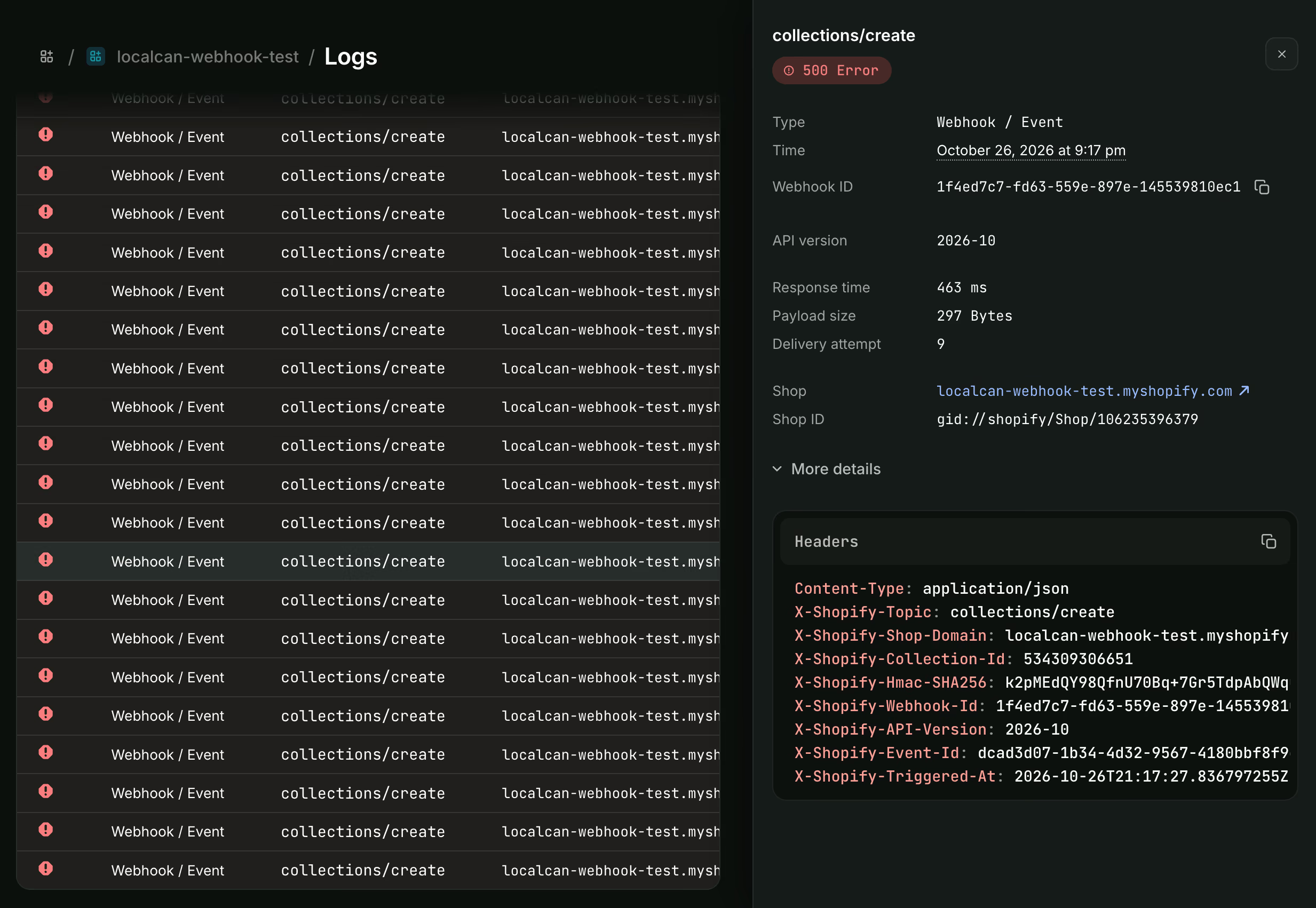
Shopify's own log shows the same count. In the Dev Dashboard's Logs, the last attempt of the failing delivery is Delivery attempt 9, answered with a 500, under the same webhook ID:
Did Shopify delete the subscription?
Not in these runs. The same guide says "After 8 consecutive failures, the subscription is automatically deleted if it was configured using the Admin API" (Verify webhook deliveries↗), but both subscriptions were still in the webhookSubscriptions list 3 hours after their ninth failure.
In case the rule counts deliveries rather than attempts, I then created 8 more collections within 5 seconds, with the subscription still pointed at the route that answers 500. Each delivery got the same nine attempts over 4 hours, the last at 08:21 UTC. An hour later the subscription was still listed, after 9 failed deliveries and 81 failed attempts with no successful delivery from Shopify in between. Both tests ran on a development store.
The guide also says warning emails go to "the app's emergency developer email address". That address is a Partner Dashboard setting (Partner settings → Emergency developer contact information), and it was empty on this new Partner account. With it filled in, a third failing subscription got the same nine attempts over 4 hours, was still listed afterward, and no warning email arrived.
Subscriptions declared in shopify.app.toml are exempt either way: "Failing subscriptions will not be deleted by Shopify" (Manage webhook subscriptions↗).
So check with the query rather than going by the docs. If the subscription is missing, fix the handler first and then create it again: "Removed webhook subscriptions won't receive any deliveries unless you create them again" (Troubleshoot webhooks↗).
Can you get the failed deliveries back?
Shopify sends nothing after the last retry, but every failed attempt is still in the inspector with its body and headers, signature included. After pointing the route at the real handler, I replayed the first and the last failed attempt from a script that sends the same daemon call as the inspector's Replay button:
$ localcan traffic ls --last 4
ID        TIME      METHOD  STATUS  DUR     PATH   HOST
510b5e2c  05:20:30  POST    200     5ms     /fail  cool-falcon.localcan.dev
ba8e731c  05:20:30  POST    200     8ms     /fail  cool-falcon.localcan.dev
4b90e966  02:19:53  POST    499     5748ms  /slow  cool-falcon.localcan.dev
e897eb2f  02:17:38  POST    500     32ms    /fail  cool-falcon.localcan.dev
Both replays got 200 from the handler, which answers 401 when the HMAC check fails, and the older one was 7 hours old. The handler computes the HMAC over the body alone, so a capture verifies for as long as you keep it. A script that sent the same request with one byte of the body changed got 401.
Replay sends the request straight to your local server, so Shopify never sees it. The inspector keeps the most recent 250 exchanges in memory and clears them when the daemon restarts (traffic inspector), so export the ones you need with localcan traffic get <id> --format curl before that. The same capture and replay loop works for Stripe events too (testing Stripe webhooks locally).
Verify the fix
- Run the
webhookSubscriptionsquery and check the topic, theuriand theapiVersion. - Make a real change in the store (create a product, complete a draft order). The
shopify app webhook triggercommand does not test the subscription. - Check the delivery in the inspector: a 200 well under 5 seconds, the
X-Shopify-Topicyou expect and theX-Shopify-API-Versionyour handler was written for. - Check the same delivery in the Dev Dashboard Logs a few minutes later.